



Key takeaways
Etsy support response times vary widely based on ticket volume and complexity.
You can speed up responses by providing clear details and using the right contact channels.
Automating fulfillment and listing creation with Listybox drastically reduces the issues that trigger support tickets.
Zero-Touch Fulfillment eliminates manual order processing errors that lead to customer complaints.
A proactive workflow frees you to focus on design and sales, not damage control.
Etsy support response time is a constant source of anxiety for sellers. When a customer dispute, a listing error, or a fulfillment glitch hits, every minute you spend waiting for a reply can feel like an hour. For Maya, a graphic designer who recently launched her own boutique print-on-demand shop, that waiting game almost cost her a bestseller. After a supplier mix-up left a customer without a tracking number, she submitted a help request to Etsy and then… silence. She checked her inbox obsessively, imagining the negative review that could tank her new store. But the real problem wasn’t just the slow reply. It was the reason she needed support in the first place.
In this guide, we’ll walk through what affects Etsy support response times, how to get faster answers, and more importantly, how to build a workflow that drastically reduces the number of tickets you ever have to open. Because the best support ticket is the one you never need to file.

How Long Does Etsy Support Actually Take to Respond?
Etsy doesn’t publish a guaranteed service-level agreement for seller support. Response times depend on a mix of factors: the nature of your issue, the current volume of tickets, and whether you’re contacting them during a holiday rush or a quiet weekday. While many sellers report getting an initial automated acknowledgment within minutes, a personalized, human reply can take anywhere from a few hours to several business days. Complex cases involving policy violations or payment disputes may stretch even longer.
This uncertainty can be maddening when you’re trying to keep your shop running smoothly. A delayed response on a listing takedown could mean days of lost visibility. A slow resolution to a fulfillment error might push a customer to open a case, threatening your shop’s standing. Sellers chasing Star Seller status feel this pressure acutely: your response time to customer messages is measured in hours, but Etsy’s own support operates on a different clock. For a deeper look at how support speed affects your seller metrics, read our guide on Etsy Customer Service: How Response Time and Customer Satisfaction Impact Your Star Seller Status.
💡 Before contacting support, search the Etsy Help Center. Many issues, like refund processing or listing violations, have instant solutions that don’t require a ticket.
What Influences Etsy’s Response Speed?
Ticket category: Urgent issues like account security or intellectual property complaints often get faster triage than general how-to questions.
Time of year: The holiday season brings a flood of tickets, stretching support teams thin. A ticket submitted in November might take longer than one in February.
Completeness of your request: A ticket that includes your order number, a clear description, and any relevant screenshots moves through the queue faster because the agent doesn’t have to ask for more details.
Your seller history: While Etsy doesn’t publicly state it, established shops with a clean track record may see slightly quicker resolutions for certain issues compared to brand-new shops that are still being verified.
Why Is My Etsy Support Ticket Taking So Long?
Maya’s frustration wasn’t just about the wait. It was about the helplessness of watching her shop’s reputation hang in the balance while she could do nothing. That feeling is common, and it often stems from a hidden trap: the more manual and fragmented your workflow, the more likely you are to generate situations that require Etsy’s intervention.
Think about the typical print-on-demand seller’s day. You’re designing, listing, processing orders, tracking shipments, and handling customer messages. If you’re manually forwarding each Etsy sale to a print provider, one missed email or a copy-paste error can mean a customer never gets a tracking number. If you’re writing listing descriptions from scratch, you might accidentally use a trademarked phrase and get flagged. Each of these mistakes spawns a support ticket - not because Etsy is slow, but because your process is leaky.
⚠️ Relying on manual order processing increases the risk of delays, incorrect items, and missing tracking - all of which lead to customer complaints and support tickets.
Maya’s fulfillment error happened because she was juggling orders from two different suppliers and forgot to update one. A single missed step turned into a customer complaint, then a ticket, then days of anxiety. The real fix wasn’t a faster support team; it was a system that prevented the error altogether.
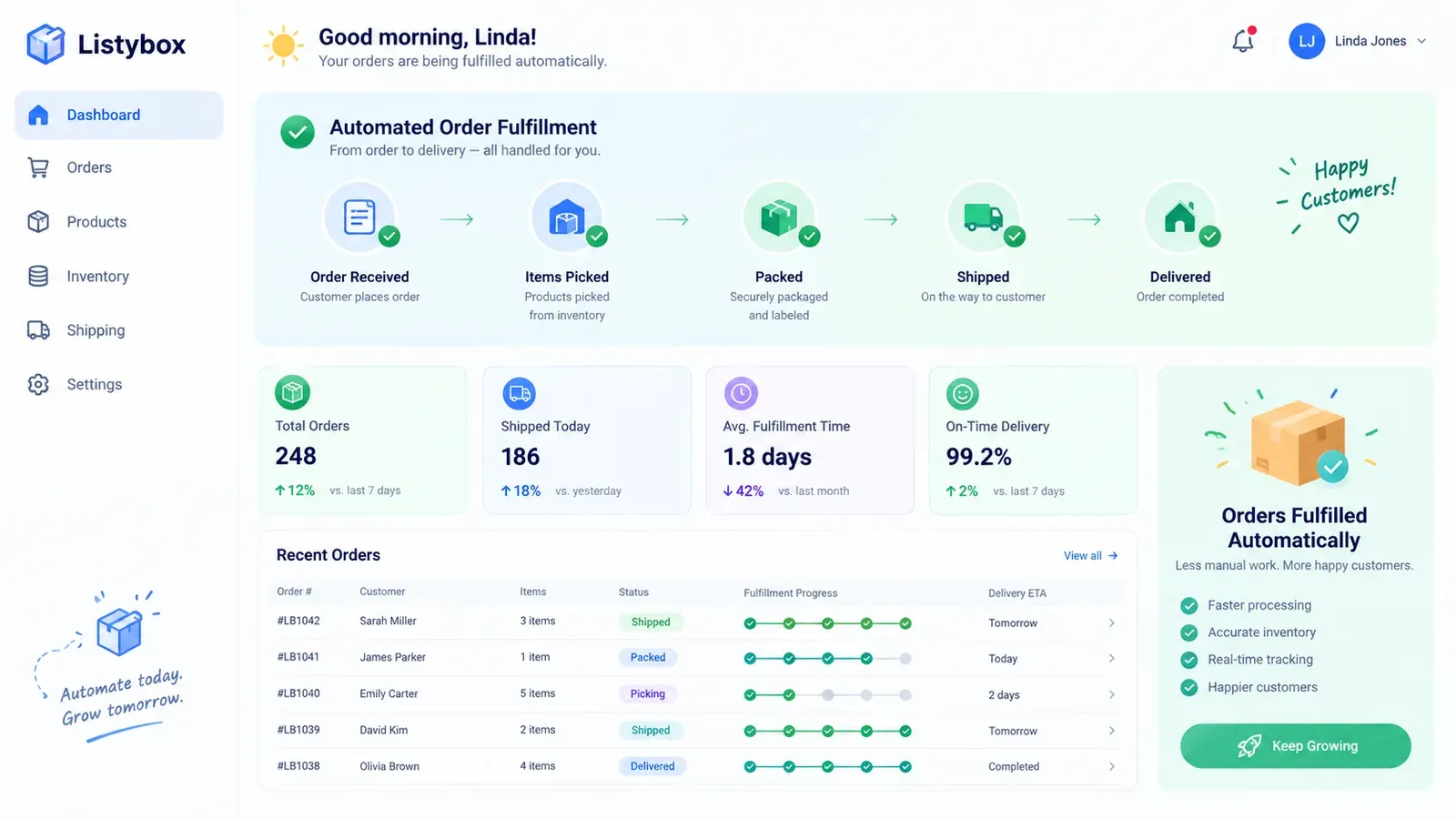
That’s where automation changes the game. Listybox’s Zero-Touch Fulfillment acts as your personal operations manager. When an Etsy order comes in, Listybox detects it automatically, routes it to the best-performing print provider, and sends all necessary details. Once the item ships, the tracking number is pulled back and the Etsy order is closed automatically - and the customer is notified. No manual forwarding, no missed steps, no support tickets born from fulfillment chaos. You can read more about how this works on the feature page.
How to Get Faster Etsy Support Responses
While you work on reducing your need for support, you still need to know how to get help quickly when something goes wrong. These practical steps can shave hours or even days off your wait time.
Use the Right Contact Channel
Etsy’s Help Center is the starting point. Navigate to your specific issue category and use the contact form at the bottom of the relevant article. This ensures your ticket lands in the correct queue. For account security emergencies, Etsy sometimes provides a phone callback option, but email remains the primary channel for most sellers. Avoid sending DMs to Etsy’s social media accounts for support - those are not monitored for individual seller issues.
Write a Ticket That Gets Solved Fast
Subject line: Be specific. Instead of “Order problem,” write “Order #123456789 – Missing tracking number.”
Body: State the issue in the first sentence. Then add order numbers, buyer usernames, and a brief timeline. Attach screenshots if they show an error message or a conversation.
One issue per ticket: Bundling multiple problems confuses the triage system and delays resolution.
💡 If your Star Seller badge is at risk because of a case or a late response, mention it clearly. Etsy agents may prioritize tickets that directly impact seller performance metrics.
Check Your Ticket Status Online
After submitting, you’ll get a confirmation email with a link to view your ticket status. Instead of opening a second ticket (which pushes you to the back of the queue), use that link to add follow-up notes if needed. Duplicate tickets slow everything down.
For brand-new sellers who are still learning the platform’s ins and outs, the learning curve itself can generate support tickets. Our How to Start Selling on Etsy: The 2026 Beginner’s Guide walks you through the entire setup process, helping you avoid common pitfalls that lead to policy flags and confused help requests.
Reducing Your Need for Etsy Support with Automation
The most effective way to beat slow support response times is to need support less often. That means building a workflow where the most common ticket triggers - fulfillment errors, listing takedowns, SEO confusion - are handled before they become problems.
Automate Fulfillment to Eliminate Order Issues
We already touched on Zero-Touch Fulfillment. By removing manual order processing, you almost completely erase the class of tickets related to missing tracking, wrong items, or delayed shipments. When every order flows through the same automated pipeline, consistency replaces chaos.
Create Compliant, SEO-Ready Listings with Magic Wand
Policy violations are a major source of support tickets. Using a banned keyword, a trademarked phrase, or a prohibited product claim can get your listing pulled in minutes. Listybox’s Magic Wand analyzes your product and design, then writes SEO-optimized titles, 13 tags, and descriptions that are designed to comply with Etsy’s guidelines. You review and edit everything before publishing, so you keep full control, but the heavy lifting - and the risk of accidental violations - is drastically reduced.
Fix Multiple Listings in Minutes with Bulk Edit
Imagine Etsy updates its policies and suddenly a word in 50 of your listings becomes problematic. Manually editing each one is a recipe for errors and, yes, support tickets. With Listybox’s Bulk Edit feature, you select the listings, choose the field you want to change (title, description, tags), and apply the edit across all of them in minutes. This keeps your entire catalog compliant without the grind. You can learn more about staying on the right side of Etsy’s rules in our post on Etsy Print on Demand Rules: Navigating Policy Changes in 2026.
Stay Visible Without Constant Tweaking
SEO-related support questions - “Why isn’t my listing showing up?” - often come from not understanding how Etsy’s search algorithm works. Instead of filing a ticket, you can use Listybox’s Magic Wand to generate keyword-rich content that aligns with what shoppers are actually searching for. Our guide on Etsy Search Engine Optimization: A 2026 Guide for Print-on-Demand Sellers explains the principles in detail, but the tool itself does the heavy lifting so you’re not left guessing.
The Bigger Picture: From Reactive to Proactive
When you combine these features, your shop shifts from a reactive stance - constantly putting out fires and waiting for Etsy support - to a proactive one. You’re not just speeding up support; you’re making it largely unnecessary. This frees up mental bandwidth to focus on what you actually enjoy: creating new designs, researching trends, and growing your brand.
Ready to stop refreshing your support inbox? Start free - no credit card required and see how Listybox’s automation tools can transform your daily workflow.
Maya’s New Workflow: From Support Tickets to Sales Growth
Let’s return to Maya. After her tracking-number nightmare, she decided to stop treating the symptom and fix the root cause. She connected her Etsy shop to Listybox and activated Zero-Touch Fulfillment. Now, when a sale comes in, she doesn’t lift a finger. The order routes to the supplier, the tracking updates automatically, and the customer gets notified without her involvement. She hasn’t filed a fulfillment-related support ticket since.
She also started using Magic Wand for every new listing. Instead of worrying about accidental trademark use or weak SEO, she lets the tool generate a draft, then tweaks it to match her brand’s voice. Her listings stay live, her visibility improves, and the only emails she gets from Etsy are sale notifications.
Maya still checks her shop stats regularly, but she no longer dreads opening her support inbox. The time she used to spend troubleshooting and waiting for replies now goes into designing new collections and engaging with her customers on social media. She didn’t need a faster support team. She needed a smarter system.
You can build that same system. Listybox gives you the tools to automate the parts of your business that generate support tickets, so you can focus on the parts that generate revenue. See our pricing plans to find the right fit for your shop, or log in if you already have an account.
Listybox
Create listings 10x faster with Listybox.
Frequently asked questions
Put this into practice in your shop.
Every step from design to live listing, on one platform. Start on the free plan.
Related posts



Want to go deeper? Read our in-depth Etsy guides · Browse 100 Etsy niche guides