
How to Open an Etsy Shop Step by Step in 2026: The Complete Guide
Starting an Etsy shop manually can feel overwhelming when you face confusing policies, complex SEO rules, and tricky payment configurations. This step-by-step guide walks you through the entire process from account creation to your first sale. Learn how to bypass the initial grind, avoid common beginner mistakes, and launch a professional store with confidence.
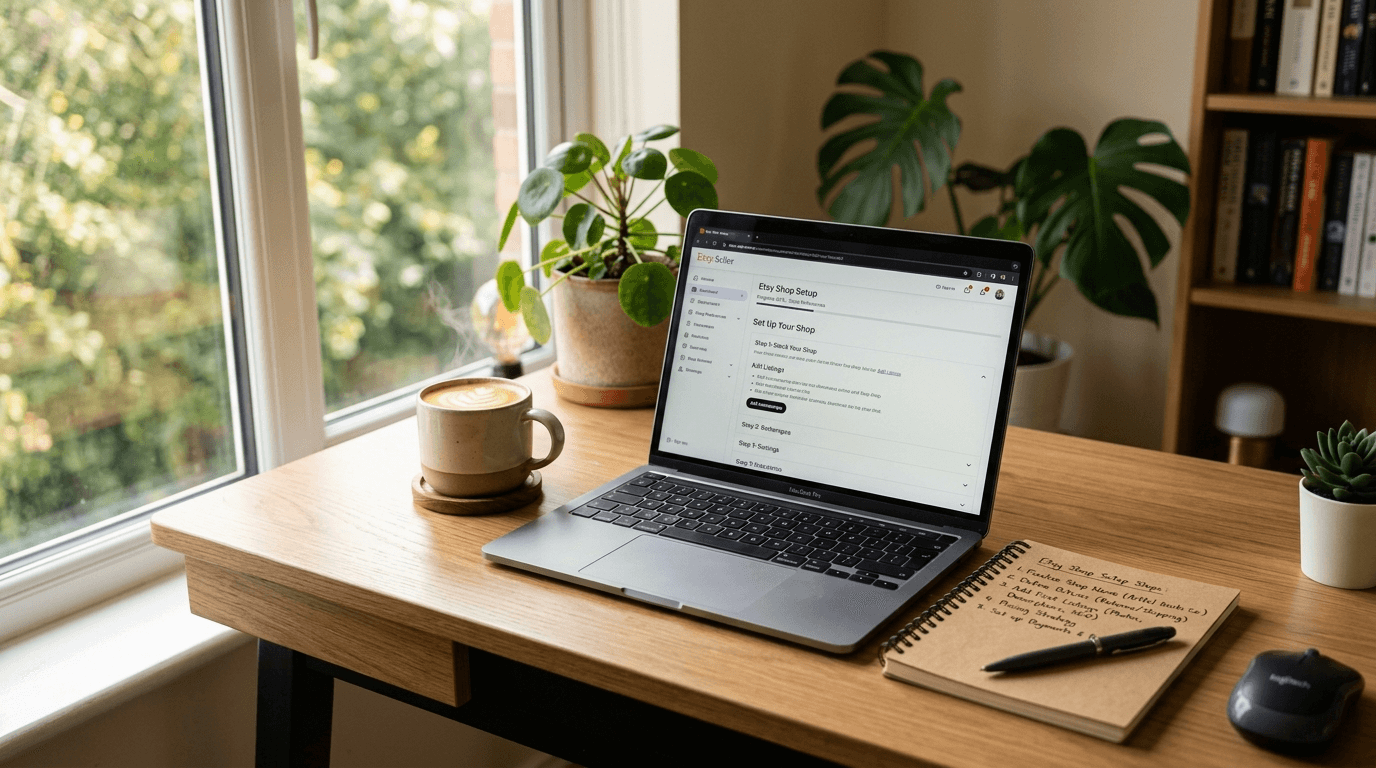
Bullet Points (TL;DR)
Preparation is Key: Gather your identity documents, bank details, and shop name ideas before starting the registration process.
Understand the Fees: Be aware of listing fees, transaction fees, payment processing fees, and regional regulatory fees before pricing your products.
Master the First Listing: Your first product listing requires high-quality photos, a keyword-rich title, and all 13 tags filled out properly to rank.
Avoid Common Traps: Prevent early failure by setting up complete shipping profiles, writing clear shop policies, and choosing the exact right product categories.
Turkish Seller Nuances: Pay special attention to Etsy Payments setup, micro-export rules, and currency choices when operating from Turkey.
Automate Early: Use intelligent tools to bypass the manual labor of product creation and SEO writing.
Starting an online business is one of the most exciting decisions you can make. The idea of waking up to new sale notifications and building a brand from your laptop is a powerful motivator. But the reality of getting started often feels very different. When you sit down to actually build the store, you are immediately hit with a wall of confusing settings, policy requirements, and technical hurdles.
Many new sellers get stuck right at the starting line. The process of figuring out payment gateways, calculating shipping profiles, and understanding search engine rules can turn your excitement into frustration. You might spend days just trying to get one single product to look right on the screen. It is a slow, manual grind that drains your energy before you even make your first sale.
This guide is designed to clear the confusion. We will walk through exactly how to open an Etsy shop step by step in 2026. You will learn the exact buttons to click, the policies you need to set, and the common traps that cause new stores to fail. We have also included special guidance for Turkish sellers who face unique regional requirements. By the end of this guide, you will have a clear roadmap to launch a professional, ready-to-sell storefront.
Step 1: Creating Your Account and Setting Preferences
The first phase of opening your store involves setting up the basic foundation. This is where you tell the platform who you are and how you plan to operate. You need to prepare a dedicated email address for your business to keep things organized.

Registering as a Seller
Start by visiting the main Etsy homepage. Scroll all the way down to the bottom and click on "Sell on Etsy". You will be prompted to enter an email address, your first name, and a password. Once you confirm your email, you can click "Open your Etsy shop" to begin the actual setup wizard.
The platform will ask you a few introductory questions about your experience level. You can answer these honestly; they do not affect your store's visibility or features. They simply help the platform tailor its educational content for your dashboard.
Shop Preferences and Currency
Next, you will set your shop language, country, and currency. This is a critical step because your shop language becomes the default language you use to write your item descriptions and tags. You cannot change your default shop language later, so choose carefully.
If you plan to sell globally, setting your shop language to English is generally the best practice. You can always add manual translations for other languages later.
Always set your shop currency to match the currency of your target market or your primary bank account to avoid unnecessary conversion fees.
Special Notes for Turkish Sellers: Location and Currency
If you are operating from Turkey, your shop country must be set to Turkey. This is a legal requirement for identity verification and payment processing. Do not try to set your location to the US or UK unless you have a legally registered company and physical address in those countries.
For your shop currency, you have a strategic choice. Most Turkish sellers target the United States market. Setting your shop currency to US Dollars (USD) makes it easier to price your items competitively against American sellers. However, since your local bank account will likely be in Turkish Lira (TRY), Etsy will charge a 2.5% currency conversion fee when depositing your earnings. Many sellers accept this small fee in exchange for the ease of pricing in USD.
Step 2: Choosing the Perfect Shop Name
Your shop name is the face of your brand. It is the first thing customers see, and it sets the tone for the products you sell. Choosing a name can feel like a huge commitment, but it is important not to let this step block your progress.

Brainstorming and Availability
Your name must be between 4 and 20 characters long. It cannot contain spaces or special characters. You want a name that is memorable, easy to spell, and gives a hint about what you sell. If you sell modern wall art, a name like "StudioNovaArt" works well.
Type your desired name into the search box during setup to check availability. If your first choice is taken, do not panic. Try adding words like "Studio", "Co", "Design", or "Boutique" to the end of the name.
Future-Proofing Your Brand
Avoid picking a name that is too narrow. If you name your store "CustomDogMugs", you will have a hard time expanding into t-shirts or cat-themed products later. Choose a name that gives you room to grow.
Remember that you can change your shop name once automatically after you open. If you need to change it again later, you will have to submit a request to support. Do not spend three weeks stressing over the name. Pick something clean and professional, and move forward.
Step 3: Setting Up Payments and Billing
This is the most critical technical step. You need to prove your identity and connect a bank account so you can actually get paid. The platform takes security very seriously, so any mismatch in your information will cause delays.
Verifying Your Identity
You must provide your full legal name, home address, date of birth, and the last four digits of your Social Security Number (for US sellers) or a national ID number. The name on your seller account must perfectly match the name on your bank account and your government ID.
If you are setting up as a registered business (like an LLC), you will need your business registration documents and Employer Identification Number (EIN). For most beginners, starting as an individual or sole proprietor is the easiest path.
Connecting Your Bank Account
You will need to enter your bank account routing and account numbers. The platform will usually make a small micro-deposit (a few cents) into your account within 3 to 5 business days. You must log back in and enter the exact amount of that deposit to verify you own the account.
Once verified, you must also add a credit or debit card on file. This card is used to pay your selling fees at the end of the month if your sales revenue does not cover them.
Special Notes for Turkish Sellers: Etsy Payments and Taxes
Turkish sellers must use the official Etsy Payments system. This system allows international customers to pay you using credit cards, Apple Pay, or PayPal, and the funds are deposited directly into your Turkish bank account.
You must enter your Turkish ID number (TC Kimlik No) during setup. For the bank account, you must provide a standard IBAN from a Turkish bank. The name on the bank account must match the name on your seller profile exactly.
Many Turkish sellers ask about using Payoneer or Wise. You can use a Wise or Payoneer TRY or USD account, provided the IBAN is registered under your exact legal name. However, using a standard local bank like Enpara or Garanti is often the smoothest route for initial verification.
Regarding taxes, you will need to enter your VAT ID if you have a registered company. If you are an individual seller utilizing the artisan tax exemption (Esnaf Muafiyet Belgesi), you can register as an individual. However, as your sales grow, forming a proper company becomes necessary for micro-export (Mikro İhracat) customs procedures.
Step 4: Crafting Shop Policies and Shipping Profiles
Before you list your first product, you must establish the rules of your store. Customers want to know when their item will arrive and what happens if there is a problem. Clear policies build trust and protect you from disputes.
Setting Up Shop Policies
Navigate to your shop settings and find the policy section. You need to clearly state your rules for returns, exchanges, and cancellations.
If you are selling personalized items, you should generally not accept returns, as the item cannot be resold. If you are selling standard print-on-demand clothing, you might accept returns within 14 days, but specify that the buyer pays for return shipping. Be clear, fair, and firm in your wording.
Creating Shipping Profiles
Shipping profiles save you massive amounts of time. Instead of typing shipping costs for every single item, you create a template. For example, you can create a profile called "Standard T-Shirt Shipping".
In this profile, you set the processing time (e.g., 2 to 5 business days) and the transit time. You then set the cost for domestic shipping and international shipping. When you create a new listing, you simply attach this profile with one click.
Special Notes for Turkish Sellers: Shipping Strategies
If you are physically shipping handmade goods from Turkey to the US or Europe, you cannot rely on standard postal services like PTT for fast delivery. Buyers expect quick shipping. You will need to partner with fulfillment companies like Navlungo, ShipEntegra, or PTS to get express shipping rates via DHL or FedEx.
If you are running a print-on-demand business, your shipping profile depends on your production partner. If your partner is located in the US, your shipping profile should reflect US domestic shipping times, even though you live in Turkey. This is a crucial distinction that many international sellers get wrong.
Step 5: Creating Your First Listing
To officially open your shop, you must create at least one active listing. This is where the real work begins. Creating a high-quality listing requires excellent photography, smart copywriting, and a deep understanding of search engine rules.
The Anatomy of a Perfect Listing
You are allowed up to 10 photos and 1 video per listing. Use all of them. Show your product from multiple angles, show it being used in real life, and include a size chart if applicable.
Your title should be highly descriptive and packed with keywords that real people search for. Do not write cute, abstract titles. Write exactly what the item is. For example: "Minimalist Gold Hoop Earrings, 14K Gold Plated Huggie Hoops, Dainty Jewelry Gift for Her".
Mastering Tags and Descriptions
You get 13 tags per listing. This is your most powerful tool to get found in search results. Use multi-word phrases (long-tail keywords) rather than single words. Instead of tagging "shirt", tag "funny cat shirt" and "gift for cat mom".
Your description should read naturally. Start with a strong hook that explains the benefit of the product. Then, use bullet points to list the exact dimensions, materials, and care instructions.
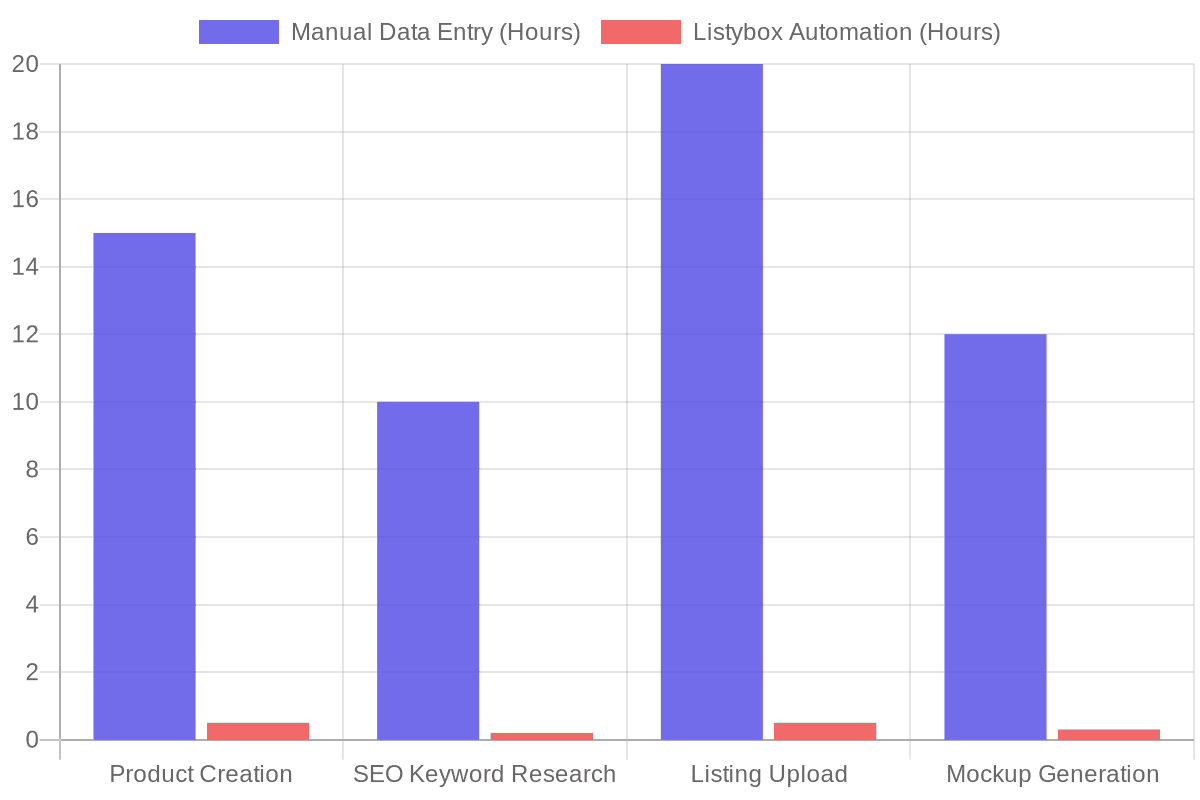
Doing this manually for one product takes about 30 minutes. If you want to launch a store with 100 products, you are looking at 50 hours of pure data entry. This manual grind is exactly why many sellers quit early or publish poor-quality listings that never sell.
If you want to bypass this tedious process, this is where smart technology comes in. Listybox's fine-tuned AI engine built specifically for Etsy handles all of this heavy lifting. By using the Creation Wizard, you can generate hundreds of product variations instantly.
Furthermore, the Magic Wand SEO tool analyzes market data to automatically write high-converting titles, descriptions, and all 13 tags for you. It turns hours of frustrating keyword research into a single click, ensuring your first listings are perfectly structured to rank on page one.
Understanding the Costs: The 2026 Fee Structure
Before you finalize your shop, you must understand exactly how much it costs to run this business. Pricing your products blindly is a guaranteed way to lose money. You need to account for four main types of fees.
The Four Core Fees
1. Listing Fee: You pay $0.20 to publish a listing. This listing stays active for four months. If the item sells, it automatically renews for another $0.20. 2. Transaction Fee: When you make a sale, the platform takes a 6.5% cut of the total order amount. This includes the shipping cost. 3. Payment Processing Fee: This fee varies by country. In the US, it is typically 3% plus $0.25 per transaction. In Turkey, it is usually around 6.5% plus 3 TRY. 4. Regulatory Operating Fee: Sellers in certain countries (including the UK, France, Italy, Spain, and Turkey) are charged an additional percentage on each sale to cover local digital service taxes. For Turkey, this is an extra 1.5%.
Data shows that new sellers who do not properly calculate their profit margins end up losing an average of $1.50 per sale due to hidden shipping and regulatory costs.
To ensure you are actually making a profit, you must use a reliable calculator before setting your retail prices. For a deep dive into calculating your exact margins, review The Complete Etsy Fees Calculator Guide for 2026.
The 5 Most Common Mistakes New Sellers Make
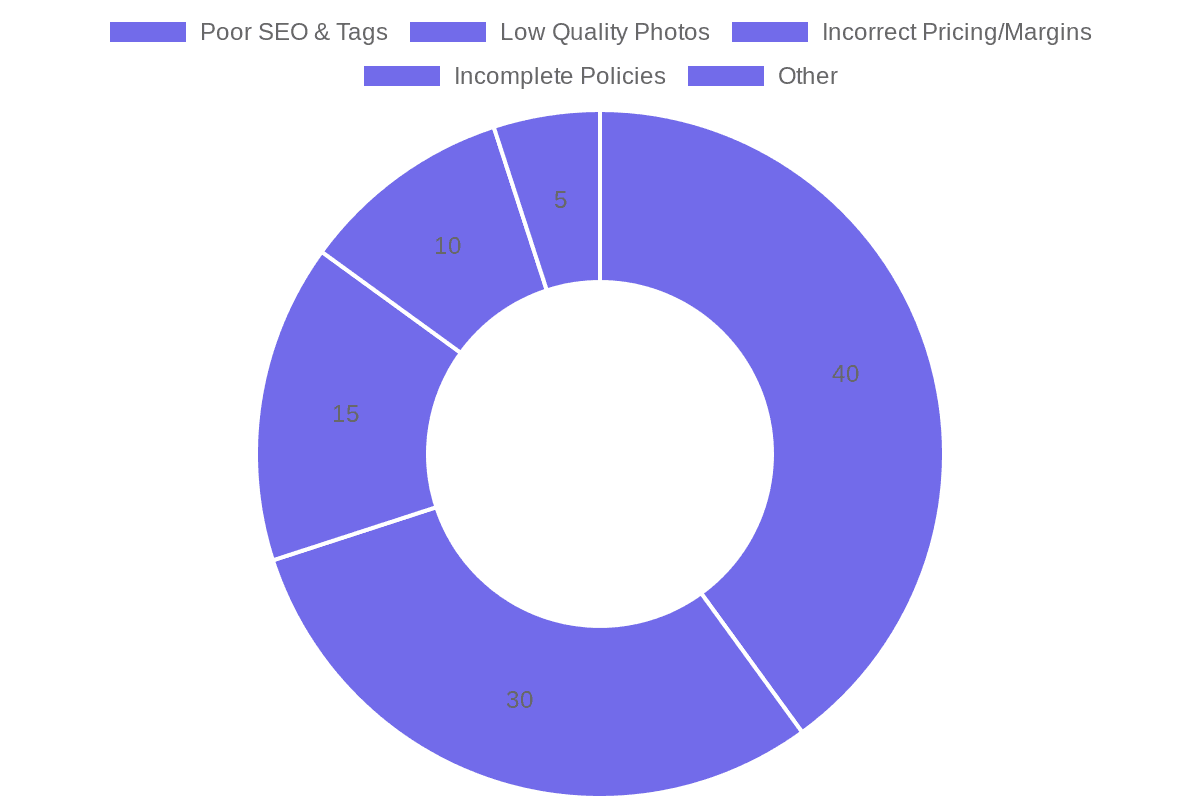
Even with a step-by-step guide, it is easy to fall into traps that hurt your visibility. Avoid these five common errors that instantly flag your shop as amateur.
1. Choosing the Wrong Categories
Categories act like massive, invisible tags. If you sell a digital planner and put it in the "Physical Books" category, the algorithm will show it to the wrong buyers. Those buyers will not click, your conversion rate will drop, and your item will be buried. Always drill down to the most specific sub-category possible.
2. Incomplete Shipping Profiles
Leaving your shipping times vague is a major red flag for buyers. If a customer cannot see exactly when an item will arrive, they will buy from a competitor. Furthermore, the platform rewards shops that offer fast, reliable shipping. Incomplete profiles can disqualify you from achieving Star Seller status. You can learn more about these specific metrics in our guide on Etsy Star Seller Requirements 2026.
3. Keyword Stuffing Titles
Five years ago, sellers would name their products "Mug Coffee Cup Tea Cup Gift for Mom Funny Mug White Ceramic". Today, the algorithm penalizes this behavior. Titles must be readable by humans. Use clear punctuation and natural phrasing. Place your most important keywords in the first 40 characters.
4. Ignoring Shop Policies
Shops with blank policy sections are penalized in search rankings. The platform wants to ensure a safe buying experience. If you do not have a return policy stated, the platform will automatically side with the buyer in any dispute. Fill out every section of your policy page clearly.
5. Using Generic, Boring Mockups
If you are selling print-on-demand products, you are likely using the exact same flat, white-background mockup as 10,000 other sellers. Buyers scroll right past these. You need lifestyle images that show the product in a real environment.
Instead of paying for expensive photography software, you can use Listybox's intelligent image generator. It places your designs into highly realistic, beautiful lifestyle scenes with a single click, instantly elevating your brand above the competition.
How to Fast-Track Your Launch
Setting up a store correctly takes intense focus. You have to navigate legal details, write SEO copy, design products, and calculate margins. For many creative entrepreneurs, this technical setup process is a massive roadblock that delays their launch by weeks or even months.
Does all of this feel overwhelming? You don't have to start from scratch. With Listybox Store Setup, our expert team sets up your Etsy store, lists your first 10 products, and optimizes everything for SEO. We handle the branding, the policies, and the technical configurations so you can focus entirely on your business strategy. This service is included FREE with annual Starter and Professional plans!
Conclusion and Next Steps
Opening your shop is just the beginning of your e-commerce journey. By following these exact steps, setting up proper policies, and understanding the fee structure, you are building a solid foundation for your business.
Remember to take your time during the identity verification process, choose your keywords carefully, and always present your products with high-quality visuals. The initial setup requires effort, but once your systems are in place, you can focus on creating great products and growing your sales.
Now that you know the exact steps, it is time to take action. Gather your documents, brainstorm your shop name, and take that first step toward building your online business today. Start your free trial - no credit card required.
Never Miss an Update
Get actionable Etsy tips delivered to your inbox every week. No spam, unsubscribe anytime.



