
How to Open a New Etsy Shop in 2026: A Step-by-Step Guide
Staring at a blank Etsy seller dashboard can feel intimidating. The fear of making a technical mistake or choosing the wrong products stops many talented creators from ever launching. Learn the exact, step-by-step process to open your store and start generating sales without the manual grind.

Bullet Points (TL;DR)
Understand the exact fee structure of Etsy before you list your first item to ensure healthy profit margins.
Follow a clear, six-step process to register your seller account without technical frustration.
Learn why the print-on-demand business model is the safest way for beginners to start selling online.
Master the basics of Etsy search ranking to ensure your products actually get seen by paying customers.
See how intelligent automation can handle the heavy lifting of store creation and order fulfillment.
Starting an online business is one of the most exciting decisions you can make. The idea of waking up, checking your phone, and seeing notifications for new sales is a dream shared by millions. However, the reality of figuring out how to open a new Etsy shop can quickly turn that excitement into confusion.
Many beginners stare at the registration screen and feel completely lost. You might wonder what to name your store, how to handle shipping, or what fees you will actually have to pay. The technical hurdles alone are enough to make some people quit before they even publish their first product.
This complete guide will walk you through the exact process of launching your store in 2026. We will break down the costs, explain the technical setup, and show you how to find products that actually sell. By the end of this article, you will have a clear roadmap to building a profitable online business. You can also read our related article on How to Open an Etsy Shop Step by Step: The Complete 2026 Guide for even more context.
Understanding the True Costs of Selling on Etsy
Before you create an account, you need to understand the financial side of the platform. Etsy is a business, and they charge fees for using their marketplace. Knowing these numbers upfront is the only way to ensure your new venture is actually profitable.
Many new sellers make the mistake of pricing their items too low because they do not account for all the hidden fees. Let us look at the exact costs you will face as a new seller in 2026.

The Listing Fee
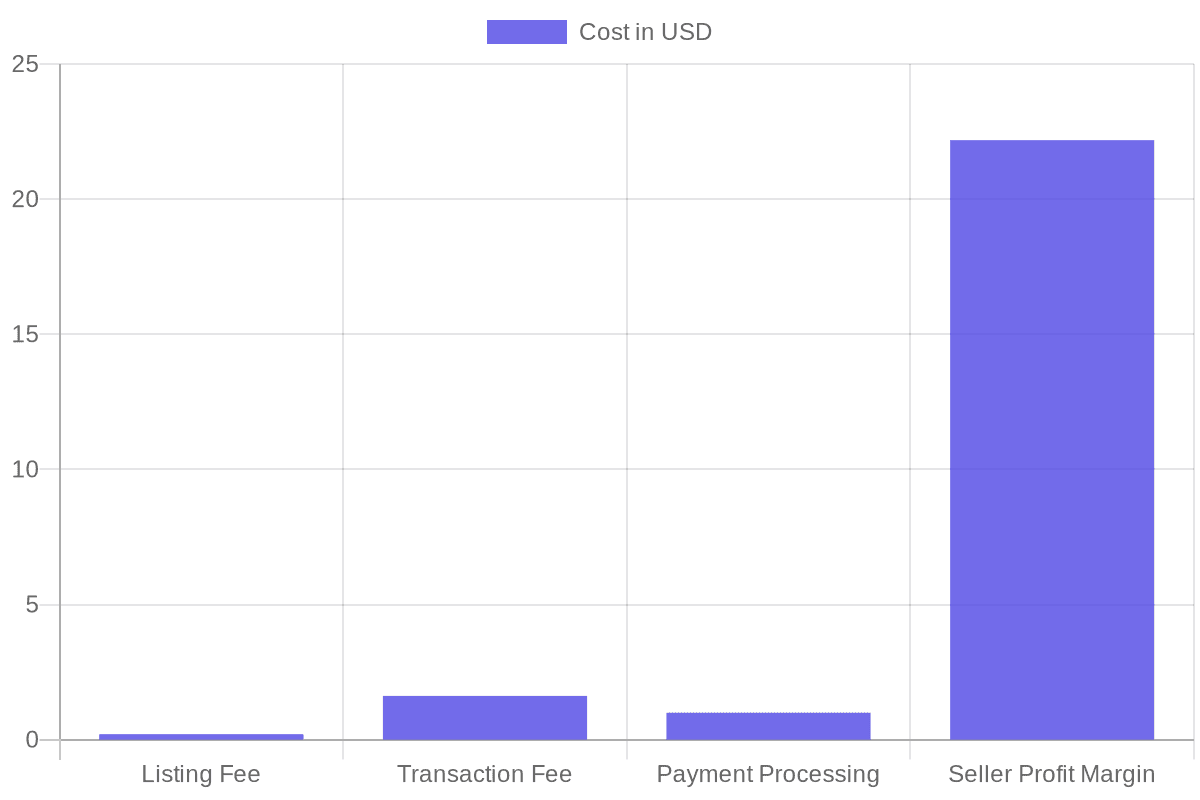
Every time you publish a new product on your store, Etsy charges a flat fee of $0.20. This fee applies regardless of whether the item sells or not. The listing remains active for four months. If the item does not sell within those four months, you will need to pay another $0.20 to renew it.
If you sell multiple quantities of the same item, you will be charged an auto-renewal fee of $0.20 after each sale. For example, if a customer buys three identical coffee mugs from you in a single order, you will pay the initial $0.20 to list it, plus $0.40 to renew the listing for the two additional items sold.
The Transaction Fee
When you successfully make a sale, Etsy takes a percentage of the total order amount. Currently, the transaction fee is 6.5%. It is crucial to note that this 6.5% is calculated on the total amount the buyer pays, which includes the product price, the shipping cost, and any gift wrapping charges.
This means if you sell a shirt for $20 and charge $5 for shipping, Etsy will take 6.5% of the full $25. You must factor your shipping costs into your pricing strategy to protect your profit margins.
Payment Processing Fees
Etsy uses its own payment system called Etsy Payments. This allows buyers to pay with credit cards, PayPal, Apple Pay, and Google Pay. For providing this service, Etsy charges a payment processing fee.
This fee varies depending on your country. In the United States, the fee is typically 3% of the total transaction amount plus a flat $0.25. Just like the transaction fee, this percentage is applied to the total order value, including shipping and taxes.
Regulatory Operating Fees
Depending on where your business is located, you might also see a Regulatory Operating fee on your bill. This is a small percentage charged to sellers in certain countries (like the UK, France, Italy, Spain, and Turkey) to cover the cost of digital services taxes in those regions.
Our internal data shows that new sellers who use a profit calculator before launching are 60% more likely to maintain a profitable store in their first year compared to those who guess their pricing.
The Exact Steps to Create Your Seller Account
Now that you understand the costs, it is time to actually build the store. The registration process is straightforward if you take it one step at a time. Do not rush this part, as making mistakes in your initial setup can cause delays in getting paid later.
Here is the step-by-step process to get your digital doors open.

Step 1: Create an Etsy Account
If you have ever bought something on Etsy, you already have a buyer account. You can use this same account to open your shop. Simply log in, scroll to the bottom of the homepage, and click on "Sell on Etsy". If you are completely new to the platform, you will need to register with an email address, create a password, and verify your email.
Step 2: Set Your Shop Preferences
Once you begin the setup process, the first screen will ask for your shop preferences. You need to select your shop language, your home country, and the currency you want to use for pricing your items.
It is highly recommended to choose the currency of the country where your bank account is located. If you choose a different currency, Etsy will charge a currency conversion fee every time they deposit money into your account.
Step 3: Choose Your Shop Name
This is the step where many beginners get stuck. Your shop name must be unique across the entire platform. It must be between 4 and 20 characters long, and it cannot contain spaces or special characters.
Do not spend weeks agonizing over the perfect name. You can always change your shop name later if you rebrand. Pick something simple, memorable, and related to what you plan to sell.
Before finalizing your shop name, do a quick search to ensure the matching domain name and social media handles are available. This helps build a cohesive brand identity later.
Step 4: Stock Your Shop
Etsy requires you to create at least one listing before you can complete the registration process. If you do not have a finished product yet, do not panic. You can create a "dummy" listing with a placeholder photo, a basic title, and a random price.
Once your shop is fully open, you can immediately deactivate or delete this placeholder listing. The goal right now is just to get past this mandatory step.
Step 5: Choose How You Will Get Paid
This is the most important step for your cash flow. You need to link a bank account where Etsy can send your profits. You will need to provide your bank routing number and account number.
Etsy will also ask for your tax information. In the United States, this means providing your Social Security Number or your Employer Identification Number. They need this for tax reporting purposes, and your information is kept secure. For more details on compliance, you can read Etsy's official seller guidelines.
Step 6: Set Up Billing
Finally, you must provide a credit card or debit card. Etsy keeps this card on file to charge you for your listing fees and any advertising costs if your shop balance is zero. Once you enter this information, you can click "Open Your Shop" and your store will be live on the internet.
Does all of this feel overwhelming? You do not have to start from scratch. With Learn more about Store Setup, our expert team sets up your Etsy store, lists your first 10 products, and perfectly formats everything for search ranking. This service is included FREE with annual Starter and Professional plans!
Choosing a Profitable Business Model
Opening the store is only the first part of the journey. The real challenge is deciding what to sell. You could spend months crafting handmade goods, dealing with messy glue, expensive materials, and trips to the post office. Or, you could choose a modern, scalable approach.
Print on demand has become the most popular business model for new Etsy sellers. It removes the physical labor from e-commerce and allows you to focus purely on design and marketing.

How Print on Demand Works
In a print on demand business, you do not buy any inventory upfront. You create digital designs and place them on blank products like t-shirts, mugs, hoodies, and posters using digital mockups.
When a customer buys an item from your store, a third-party printing facility prints your design onto the blank product, packages it, and ships it directly to your customer. You keep the difference between what the customer paid and what the printing facility charges you.
Why Beginners Choose Print on Demand
The biggest advantage is risk reduction. If you design a t-shirt and nobody buys it, you lose nothing but the $0.20 listing fee. There are no boxes of unsold inventory sitting in your garage.
This model also gives you total geographic freedom. You can run your entire business from a laptop while traveling, because you never have to physically touch the products or print shipping labels.
If you want to read more about maximizing your sales with this model, check out our Etsy Conversion Rate Optimization Guide: Turn Views Into Sales.
Finding the Right Niche
The secret to print on demand success is not selling generic items. A plain shirt with a simple flower will get buried under millions of similar products. You need to target specific, passionate groups of people.
Instead of "dog shirts," target "introverted golden retriever mom shirts." Instead of "teacher mugs," target "first-year kindergarten teacher survival mugs." The more specific your audience, the easier it is to stand out and make a sale.
Finding these profitable niches manually requires hours of scrolling through social media and competitor shops. It is a tedious, exhausting process that leaves many sellers feeling burnt out.
This is where intelligent tools change the game. With the Listybox Artwork Gallery, you do not have to guess what people want to buy. You gain access to over 100,000 data-driven designs created by professional artists. You can instantly apply these proven designs to products and launch them in minutes.
Mastering Etsy Search Ranking Basics
You can have the most beautiful store in the world, but if nobody visits it, you will not make any money. Etsy is essentially a massive search engine. When a buyer types "vintage style cat poster" into the search bar, the algorithm decides which products show up on the first page.
Your goal as a seller is to prove to the algorithm that your product is exactly what the buyer is looking for. This is done through Search Engine Optimization.
The Importance of Long-Tail Keywords
Beginners often use very short, broad keywords like "blue shirt" or "wall art." These terms are far too competitive. Millions of items rank for "wall art."
You need to use long-tail keywords. These are specific phrases made up of three or more words. Examples include "minimalist geometric canvas print" or "funny matching couples camping shirts." These phrases have less competition, and the people searching for them are usually ready to buy.
Perfecting Your Listing Title
Your title is the most important factor for ranking in search results. The algorithm places the highest weight on the first few words of your title.
Do not write clever or artistic titles. Write exactly what the product is, using your best long-tail keywords. For example, instead of "The Midnight Ocean Collection," use "Navy Blue Ocean Wave Canvas Wall Art, Coastal Home Decor, Large Beach Painting."
Using All 13 Tags
Etsy allows you to add 13 tags to every listing. These tags act like behind-the-scenes keywords that tell the algorithm what your product is about.
You must use all 13 tags on every single listing. Never leave any blank. Each tag can be up to 20 characters long. Try to use multi-word phrases for your tags, and avoid repeating the exact same words over and over. If you use "gift for mom," do not waste another tag on "mom gift."
Never use trademarked terms in your shop name or product listings. Using words like "Disney" or "Nike" is the fastest way to get a new shop permanently suspended.
The Pain of Manual Keyword Research
Figuring out the perfect title and 13 tags for every single product is an agonizing process. You can easily spend 30 minutes researching keywords for just one listing. If you want to launch 100 products, that is 50 hours of pure, mind-numbing data entry.
Instead of staring at keyword spreadsheets, you could use Listybox's fine-tuned AI engine built specifically for Etsy. The Magic Wand SEO tool analyzes top-selling products and writes perfect titles, descriptions, and 13 tags for you with a single click. It turns hours of frustrating research into seconds of automated perfection.
Scaling Your New Business Quickly
Once you get your first few sales, you will quickly realize that volume is the key to massive success. A shop with 10 items might make one sale a week. A shop with 1,000 high-quality items can generate a full-time income.
However, scaling up presents a massive operational problem.
The Upload Bottleneck
Creating a new product listing manually involves uploading a design, selecting colors, adjusting the placement, downloading mockup photos, writing the title, adding tags, and publishing. Doing this for one item takes about 15 minutes.
If you want to add 500 new items to your store to prepare for the holiday rush, you are looking at over 120 hours of repetitive, boring work. This upload bottleneck forces many sellers to abandon their growth goals. They simply do not have the time to scale.
This is where the Listybox Creation Wizard acts like a time machine for your business. It allows you to select multiple designs and multiple blank products at the same time. With one click, it merges them together, generating hundreds of ready-to-sell products and professional mockups in less than five minutes.
Managing the Chaos of Success
As your shop grows, order management becomes another major headache. When a customer buys a shirt, you have to log into your print provider, manually type in the customer's shipping address, pay for the production, wait for it to ship, copy the tracking number, go back to Etsy, and paste the tracking number into the order details.
Doing this for one order is fine. Doing it for 50 orders a day during the busy season is a nightmare. One typo in a shipping address can lead to a lost package, an angry customer, and a bad review that damages your new shop's reputation.
True passive income means you step away from the keyboard and the business keeps running. With Zero-Touch Order Management, Listybox acts as your personal operations manager. When an order comes in, the system automatically routes it to the best manufacturer, pays for it, grabs the tracking number when it ships, and closes the order on Etsy. You do absolutely nothing but watch your profits grow.
Your Next Steps to Success
Opening a new Etsy shop does not have to be a stressful, confusing ordeal. By understanding the fee structure, following the technical setup steps carefully, choosing a smart print-on-demand model, and perfecting your search ranking, you set yourself up for long-term profitability.
The only thing standing between you and your first sale is taking action. Stop letting the fear of manual work hold you back. The tools to build a massive, automated e-commerce brand are already waiting for you.
Ready to turn your business idea into reality? Start your free trial - no credit card required and see how easy selling online can truly be.
Never Miss an Update
Get actionable Etsy tips delivered to your inbox every week. No spam, unsubscribe anytime.



