



Key takeaways
A no inventory business model eliminates storage costs and upfront stock risk, but the hidden cost is the time spent on repetitive listing tasks.
Etsy’s built-in tools leave sellers juggling multiple platforms for design, mockups, SEO, and fulfillment, which fragments your workflow.
Using Creation Wizard, you can combine designs and products in minutes instead of hours, then refine every placement before publishing.
Magic Wand generates SEO-optimized titles, tags, and descriptions based on your actual product and design, not generic templates.
Zero-Touch Fulfillment automatically routes orders to the best producer and updates Etsy, so you never touch inventory or shipping labels.
Ethan was a marketer by day, spending his evenings testing whether Etsy could become a reliable second income. He liked the idea of a no inventory business: no boxes in the garage, no trips to the post office, no risk of buying 500 units of a design nobody wanted. He opened a shop, uploaded a few print-on-demand t-shirt listings, and waited. A week later, he had zero sales and a growing suspicion that the “just list it and they will come” advice was missing a few chapters.
The reality hit when he tried to scale. Each new listing meant opening a design tool, exporting files, uploading to a mockup generator, downloading the mockup, writing a title, researching tags, crafting a description, and then repeating for every product variant. By listing number ten, he was spending more time on busywork than on his actual marketing job. The no inventory business wasn’t costing him money in stock; it was costing him evenings, weekends, and momentum.
What Is a No Inventory Business and How Does It Actually Work?
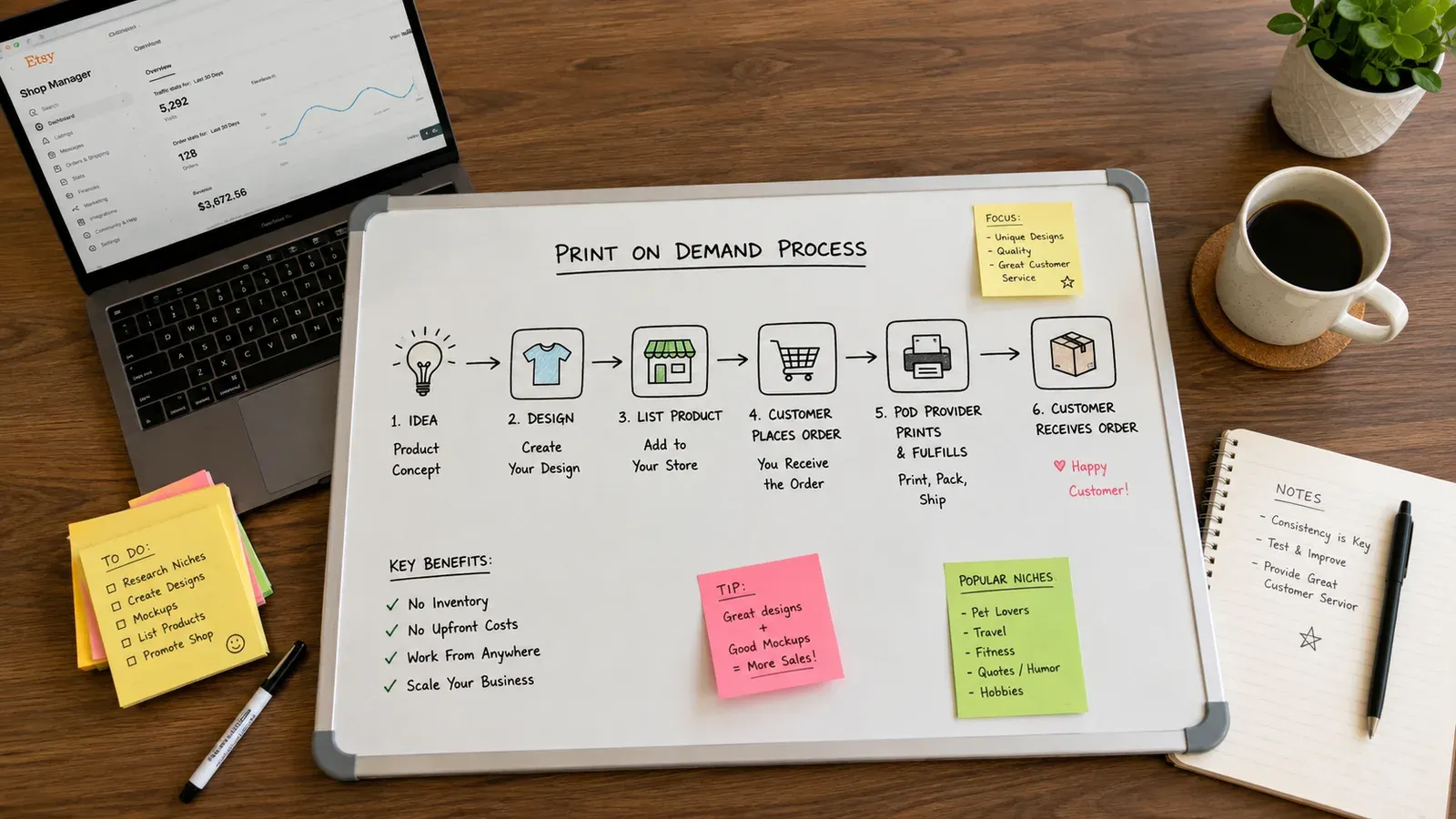
A no inventory business is exactly what it sounds like: you sell products without ever purchasing, storing, or shipping them yourself. In the print-on-demand (POD) model, you create digital designs, apply them to physical products like t-shirts, mugs, or canvas prints, and list them on marketplaces like Etsy. When a customer buys, a third-party producer prints the item and ships it directly to the buyer. You act as the brand, the curator, and the marketer, not the warehouse manager.
This model has attracted thousands of sellers because it removes the biggest barrier to entry: upfront inventory cost. You don’t need to guess which sizes or colors will sell. You don’t risk liquidating dead stock at a loss. The financial commitment per listing is minimal.
Etsy charges a $0.20 USD fee for listing an item for sale. Taxes may also apply.
That low barrier is why many side-hustlers start here. However, the operational side, the part that happens before and after the sale, is where the hidden workload lives. Understanding the full workflow helps you see where the friction points are and where automation can step in.
The Core Workflow of a No Inventory Etsy Business
The process breaks down into three stages: pre-listing, listing, and post-sale. Each stage has tasks that compound as your catalog grows.
Pre-listing stage: You research trends, source or create designs, select products from a catalog, and generate product images (mockups). Without mockups, customers cannot visualize what they’re buying. The quality of these images directly impacts click-through and conversion.
Listing stage: You write a keyword-optimized title, fill all 13 tag slots, craft a description that sells, set pricing, and configure variations like size and color. Each listing must be individually optimized for Etsy’s search algorithm.
Post-sale stage: You monitor for new orders, forward order details to your print provider, handle customer service inquiries, and manage shipping notifications. If you’re using multiple providers or custom products, this gets complex fast.
💡 Practical tip: Before you list a single product, map out your entire workflow from design to delivery. Identify which steps you’ll handle manually and which you’ll automate. This prevents you from building a business that becomes a second full-time job.
What Are the Hidden Challenges of Running a No Inventory Business Manually?
When Ethan first started, he thought the no inventory part meant no work. He quickly learned that “no inventory” doesn’t mean “no operations.” It means the work shifts from physical labor to digital labor. And digital labor, when done manually across dozens or hundreds of listings, becomes a silent time drain.
The Mockup Bottleneck
Every product needs a compelling visual. If you sell a single design on a t-shirt, hoodie, and canvas, you need at least three distinct mockups. Multiply that by ten designs, and you’re suddenly managing thirty image files, each requiring placement adjustments, background selection, and export settings. Many sellers turn to free mockup generators, but these often come with limited scenes, watermarks, or generic looks that blend into the sea of Etsy search results.
Read our deep dive on Free T-Shirt Mockup: The Hidden Costs That Are Silently Killing Your Etsy Sales to see why cutting corners here can hurt your shop’s credibility.
The SEO Time Sink
Etsy’s search algorithm relies heavily on the quality of your titles, tags, and attributes. Writing one optimized listing is a skill. Writing fifty without burning out is a marathon. Sellers often resort to copying competitor keywords or using generic templates, which leads to listings that never rank. The manual approach involves keyword research tools, spreadsheets, and hours of copywriting per product.
The Fulfillment Fragmentation
After a sale, you must log into your print provider’s dashboard, manually enter the order details, select the product variant, upload the design file, and confirm shipping. If you use multiple providers for different product types, you’re juggling logins and interfaces. Miss one order, and you risk a late shipment penalty and a negative review.
⚠️ Important warning: Relying solely on email notifications for orders can lead to missed sales. Etsy’s seller app can delay notifications, and if you’re not checking multiple times a day, a weekend order might slip past your 1-3 day processing window.
These challenges don’t kill a no inventory business overnight. They erode your motivation gradually. You start with excitement, then realize you’re spending more time on operations than on creating or marketing. That’s when the shop stalls.
How Can I Create Product Listings Without Design or SEO Skills?
You don’t need to be a graphic designer or an SEO expert to build a professional-looking Etsy catalog. The key is to separate the creative strategy from the repetitive execution. You decide what to sell and how to position your brand; the heavy lifting of file formatting, placement adjustment, and keyword research can be handled by purpose-built tools.
Sourcing Designs Without Drawing a Single Line
If you’re not an artist, you have two main paths. First, you can use a curated artwork gallery that offers ready-made, trend-driven designs. These galleries often allow you to reserve designs so you’re not selling the same generic graphic as thousands of other shops. Second, you can upload your own simple text-based designs or logos. The tool then helps you position them across multiple products.
Listybox’s Artwork Gallery contains over 100,000 data-driven designs that you can browse, reserve, and apply to products. Instead of starting from a blank canvas, you select a design that matches your niche and move straight to product creation.
Turning Designs Into Listings in Minutes, Not Hours
Once you have a design, the traditional path is to open a design tool, create product-specific files, upload them to a mockup generator, download images, and then manually enter listing details on Etsy. A smarter approach is to use a creation wizard that combines designs and products in one step.
With Creation Wizard, you select your designs from My Artworks or the Artwork Gallery, choose products from the catalog, and the system automatically generates all variants and mockups. You can then use the Placement Editor to adjust how your design sits on each product, dragging, resizing, or applying preset fit modes. Once you’re satisfied, you can apply that custom placement to all selected creations with a single click.

Writing Listings That Rank Without Keyword Guessing
SEO copywriting is where many sellers freeze. You know your product is good, but you don’t know which keywords will drive traffic. Instead of guessing or copying competitors, you can use a tool that analyzes your product and design, then generates relevant titles, tags, and descriptions.
Magic Wand takes a creation (your design applied to a product) and writes SEO-optimized listing content. It fills all 13 tag slots and crafts a description that speaks to your target customer. You review, edit if needed, and publish. You keep full control over the final output; the tool simply removes the blank-page paralysis.
If you’re also looking to create lifestyle images that show your product in real-world settings, Listystyle analyzes your design and generates hundreds of photorealistic scenes. This gives you unique visuals that help your listings stand out without hiring a photographer or spending hours in photo editing software.
For a broader look at how to build a sustainable online income with this model, see our guide on How to Make Money Online in 2026: A Realistic No-Inventory Blueprint.
What Happens After an Order Comes In When You Hold No Stock?
The moment a customer clicks “buy,” your no inventory business faces its biggest test. If fulfillment goes smoothly, the customer receives a quality product on time and leaves a positive review. If it goes wrong, you deal with refund requests, case disputes, and shop reputation damage, all without ever having seen the product yourself.
The Manual Fulfillment Routine
In a manual setup, you receive an order notification, log into your print provider’s platform, and recreate the order by selecting the correct product, size, color, and design file. You double-check the shipping address, pay the production cost, and wait for a tracking number. Once you receive it, you go back to Etsy, mark the order as shipped, and enter the tracking details. You then message the buyer with the update.
This sequence takes 5-10 minutes per order when you’re focused. If you get ten orders in a day, that’s up to two hours of data entry. And if you’re away from your computer, orders sit unprocessed, pushing against your shipping deadline.
Automating the Handoff to Production
An automated fulfillment system watches your Etsy store for new orders. When one arrives, it in minutes forwards the order details to the best-performing print provider based on the product type and destination. It includes the correct design file, variant, and shipping address. When the provider ships, the system pulls the tracking number, updates Etsy, and notifies the customer.
Zero-Touch Fulfillment is built to handle this entire chain. You don’t log into multiple dashboards or copy-paste addresses. The system detects the sale, routes it, and closes the loop. This is especially valuable if you’re selling products from different suppliers or using custom products you’ve configured in the Custom Product Hub.
💡 Practical tip: Even with automated fulfillment, spot-check your first few orders manually. Verify that design files are rendering correctly and that the correct product variants are being selected. Once you’re confident the system is configured properly, let automation handle the rest.
Handling Returns and Customer Issues
No inventory doesn’t mean no responsibility. You’re still the merchant of record. If a product arrives damaged or a customer wants a return, you need a clear policy. Check your print provider’s return and reprint policies before you list. Most reputable providers will reprint defective items at no cost, but you must initiate the process. Having a system that centralizes order history makes it easier to look up past orders and resolve issues quickly.
For a complete breakdown of how to protect your shop and set proper expectations, read Etsy Shop Policies: How to Build Trust and Protect Your Business.
How Do I Scale a No Inventory Business Without Burning Out?
Scaling a no inventory business is not about working more hours. It’s about removing the tasks that don’t require your judgment so you can focus on the ones that do: niche research, brand building, and customer engagement. The sellers who grow successfully are the ones who treat their operation like a product and constantly refine the workflow.
Batch Your Listing Creation
Instead of creating one listing from start to finish, batch similar tasks. Dedicate one session to design selection, another to mockup generation and placement, and a third to SEO optimization and publishing. This reduces context-switching and lets you build momentum.
Scheduled Publish supports this batching approach. After you’ve created hundreds of listings using the bulk creation tools, you set a publishing schedule, such as every six hours or once a day. The system then releases listings gradually, which aligns with Etsy’s preference for active, regularly updated shops without you having to be online at specific times.
Edit Listings in Bulk, Not One by One
As your catalog grows, you’ll need to make changes: update seasonal keywords, adjust pricing, or fix a description typo. Editing 200 listings individually is a recipe for burnout. Bulk editing lets you select multiple listings, choose the field you want to change (title, description, tags), and apply the update across all selected items in one action.
Bulk Edit lets you select listings, pick the field, and choose an action (add, change, remove). The changes go live across your shop in minutes. This is useful when you want to add a trending keyword to all your summer designs or update your shop announcement across every listing.
Use Trend Data to Launch Products That Sell
Guessing which designs will sell is the biggest gamble in POD. A data-driven approach scans social media, news, and search trends to identify rising topics before they peak. This lets you launch products when demand is climbing, not after the wave has passed.
Trend Compass continuously scans thousands of US-based sources. When it detects a viral trend, it generates ready-to-sell designs and a marketing strategy. You review the trend, select the designs that fit your shop, and push them to your catalog. This turns trend-chasing from a reactive scramble into a proactive process.
Keep Your Brand Consistent Across Products
When you’re rapidly adding products, brand inconsistency can creep in. Mockups with different lighting, backgrounds that clash, or design placements that vary between products make your shop look amateur. Use the Placement Editor to set consistent design positioning across all products in a collection. Use Listystyle to generate lifestyle images with a cohesive aesthetic. Small details like consistent mockup styles signal professionalism and build buyer confidence.
For more on the product side of scaling, explore our Print on Demand: The Complete Guide to Building a Profitable POD Business in 2026.

The Workflow That Keeps You in Control
Here is how a streamlined no inventory business workflow looks when you remove the repetitive manual steps:
Design sourcing: Browse the Artwork Gallery or upload your own designs to My Artworks. Reserve exclusive designs to differentiate your shop.
Product creation: Use Creation Wizard to combine designs with products. Adjust placements with the Placement Editor. Generate lifestyle images with Listystyle.
Listing optimization: Run Magic Wand on each creation to generate SEO titles, tags, and descriptions. Review and tweak as needed.
Publishing: Set a Scheduled Publish cadence to drip-feed listings onto Etsy.
Fulfillment: Let Zero-Touch Fulfillment handle order routing, tracking, and customer notifications.
Maintenance: Use Bulk Edit to update listings seasonally or add new keywords.
This workflow keeps you in the driver’s seat for creative and strategic decisions while offloading the data entry, file management, and cross-platform coordination.
Does all of this feel overwhelming? You don’t have to start from scratch. With Listybox Store Setup, our expert team sets up your Etsy store, lists your first 10 products, and optimizes everything for SEO. See the pricing page for what this service covers and what it costs.
Building a no inventory business shouldn’t mean replacing physical labor with digital drudgery. The goal is freedom: freedom from stock, freedom from shipping, and freedom from the repetitive tasks that eat into your evenings. When you structure your operation to handle the busywork automatically, you get to focus on the parts of the business that actually need you: finding new niches, connecting with customers, and growing your brand. Start building that foundation today.
Start free - no credit card required
Listybox
Create listings 10x faster with Listybox.
Frequently asked questions
Put this into practice in your shop.
Every step from design to live listing, on one platform. Start on the free plan.
Related posts



Want to go deeper? Read our in-depth Etsy guides · Browse 100 Etsy niche guides