

Key takeaways
Printify’s blog lists Placeit’s Video Maker and says Placeit is a Printify partner with no direct integration between the platforms.
In Listybox you start from the Printify product link, place your design, then make the video from the same creation with Listystyle Video.
Etsy listing videos play without sound and run 3 to 15 seconds, so plan a short clip that shows the product in use.
If you list a Printify product with Printify’s default mockups, your listing may look like other listings built on the same blank. A short product video is one way to show the item differently, if you have a way to make one.
What Printify says about video
Printify’s own blog has an article on Placeit mockups. It lists Placeit’s Video Maker among the tools for print on demand sellers, and then says it plainly: “Placeit is a Printify partner, but there is no direct integration between the platforms.” (Printify blog)
Publish your next batch.
Prepare your products and publish listings to Etsy in bulk. Start on the free plan.
Bring the Printify product into Listybox first
Listybox does not ask you to move your products or switch providers. You paste a link and the product comes in.
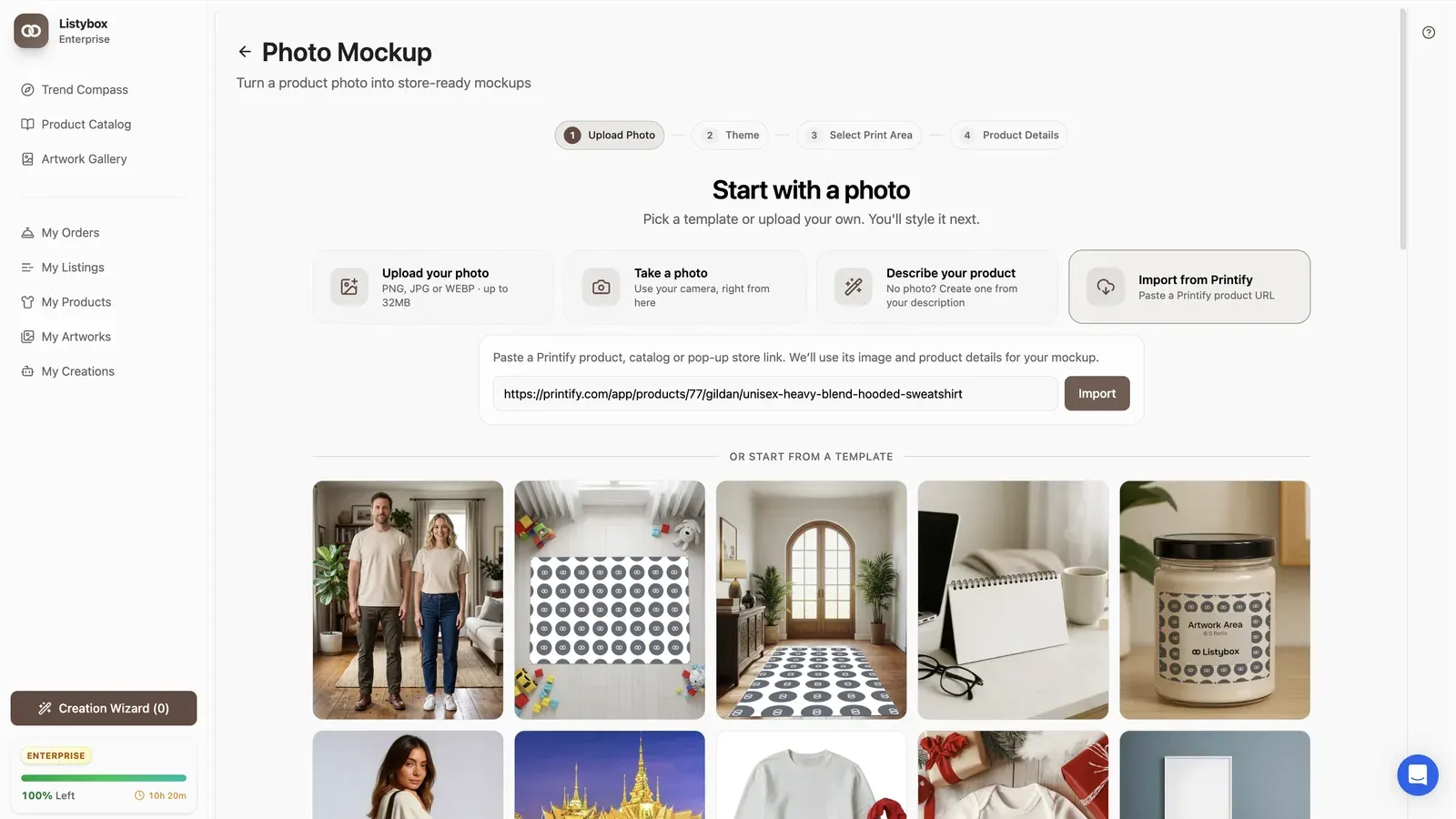
- Open Photo Mockup in Listybox and pick Import from Printify.
- Paste the link to the Printify product, its catalog page or your pop-up store. You do not need to connect a Printify account.
- The product name, description, variants and images come in from the link. Pick the image you want to work from.
- Place your design in the print area and save the creation.
The full walkthrough with screenshots is on the Printify page.
Make the video from the same creation
Once the creation exists, the video is made from it, not from a separate file.
- Select the creation you want a video for.
- Choose Lifestyle Video, then Assisted or Professional. Assisted reads your images and builds the scene for you. Professional lets you set the environment, style, lighting and angle yourself.
- Set the duration and the scene details. You can add a reference image if you have one.
- Check the review screen, then start the generation.
- Add the finished video to the creation’s media, next to the images.
The feature is described in more detail on the Listystyle Video page.
Here the design, the product images and the video sit on one creation. A second design on the same Printify blank goes through the same steps in the same place.
What makes a Printify product video work on Etsy
Etsy’s rules shape the clip more than the tool does. According to Etsy’s listing video help article, audio is removed once a video is uploaded to a listing, and a video can be 3 to 15 seconds long. Check that article for the current format and size limits before you upload.
A few habits that follow from those limits:
- Show the product in the first second. There is no voice-over to set it up, so the opening frame has to say what the item is.
- Pick a scene that matches the buyer: a mug on a desk, a hoodie on someone walking outside. Assisted mode builds the scene from your images; Professional mode is there when you already know the setting you want.
- Keep one idea per clip. Fifteen seconds is enough for one angle or one use case, not a full product tour.
- Check text and print placement. If the design has small text, make sure it stays readable at the size Etsy shows the video.
When this route makes sense
If you sell a handful of Printify products and already have a Placeit routine, keep it. The Listybox route pays off when you list the same blanks with many designs and want images, listing copy and video made from one place. The import keeps production where it is; only the work of making the listing moves.
Frequently asked questions
Put this into practice in your shop.
Every step from design to live listing, on one platform. Start on the free plan.
Related posts
Want to go deeper? Read our in-depth Etsy guides · Browse 100 Etsy niche guides