



Key takeaways
Editing Etsy listings one by one is a time-consuming process that directly limits how fast your shop can grow and adapt to trends.
The biggest risk isn’t just wasted time; it’s a critical SEO error introduced while rushing through hundreds of repetitive manual changes.
Listybox’s Bulk Edit feature gives you the power to update hundreds of titles, tags, or descriptions in a single, controlled action.
You maintain complete creative control, reviewing every change before it goes live, ensuring your brand voice stays consistent.
This workflow turns a multi-hour editing session into a task you can finish in minutes, freeing you to focus on creating new designs.
Imagine this: It’s 8:47 PM on a Tuesday. Sofia, a high school science teacher who runs a growing Etsy print-on-demand shop on the side, has just finished grading papers. She knows she needs to update her seasonal inventory. Halloween is over, and her “Spooky Season” mugs and tees need fresh keywords for the upcoming holiday rush. The thought of opening 150 individual listings, clicking “edit,” scrolling to the tags, and manually typing “Christmas Gift,” “Holiday Party,” and “Secret Santa” into each one makes her stomach drop. She does the math in her head, realizing this will eat up her entire weekend.
This isn’t just a chore; it’s a direct barrier to growth. The ability to adapt quickly to trends is what separates a thriving shop from a stagnant one. If you’re managing more than a handful of products, the Etsy platform’s native, one-by-one editing process isn’t just slow. It’s a silent killer of your momentum, creativity, and ultimately, your revenue potential. There’s a better way, one that doesn’t require you to sacrifice your evenings to the algorithm gods. Let’s break down the manual grind, expose the hidden risks, and build a smarter workflow that gives you your time back.
Why Does Bulk Editing Etsy Listings Manually Feel Impossible?
The core problem isn’t a lack of skill, it’s a lack of a practical tool. Etsy provides a basic platform for selling, but its seller interface was not built for speed at scale. When you need to make a universal change, you are forced into a repetitive, click-heavy loop that tests anyone’s patience. For a shop with 50, 100, or 500 listings, this isn’t a quick task; it’s a multi-day project.
The Hidden Cost of the One-by-One Editing Loop
Consider the physical and mental toll of this process. You open a listing, wait for the edit page to load, scroll past the images and variations, find the description field, make your change, scroll back up, hit “Publish,” and wait for the confirmation. Then, you navigate back to your listings page, find your place, and do it all over again. This repetitive action isn’t just boring, it’s mentally draining. After the first hour, your focus wanes. The risk of making a mistake, a typo in a title or a missing keyword in a tag, increases sharply. This manual grind turns a strategic business owner into a data-entry clerk.
💡 A practical tip: Before any bulk edit, export your current listings to a CSV file from your Etsy shop settings. This serves as a perfect backup. If a mistake happens, you have a snapshot of your previous state to restore from.
The SEO Risk of Manual Updates
Your Etsy SEO is a delicate ecosystem. Each title, tag, and attribute works together to signal to the algorithm what you’re selling. When you manually edit 100 listings, consistency becomes a major challenge. You might use “Christmas Gift for Mom” on one listing and “Gift for Mom Christmas” on another, which creates a fragmented SEO strategy. A single wrong character or a forgotten keyword can cause a listing that was on the first page to lose its ranking. For a deeper look at how these elements work together, check out our guide on Etsy Listing SEO Optimization: Your Step-by-Step Guide to Visibility and Sales. The manual process doesn’t just cost you time; it actively introduces risk into the one asset you’ve worked so hard to build.

What Are the Most Common Bulk Changes Etsy Sellers Need to Make?
Understanding the typical scenarios for bulk edits highlights why a dedicated tool is not a luxury, but a necessity. Most sellers don’t just want to change one word; they need to execute a strategic pivot across their entire catalog. These are not rare, edge-case scenarios. They are recurring, essential business operations that happen multiple times a year.
Seasonal Keyword Swaps
This is Sofia’s exact problem. Every holiday, every season, and every major gifting event (Valentine’s Day, Mother’s Day, Back-to-School) demands a complete keyword refresh. A design that says “Beach Vibes” in July needs to be a “Cozy Fall Essential” in September. Manually updating tags from #beachlife to #fallfashion on hundreds of products is a task most sellers dread. The tags section is particularly painful to edit manually, as it requires typing and hitting enter for each individual tag, a process that feels endless.
Pricing and Profit Margin Adjustments
Production costs from print providers can fluctuate. You might decide to run a store-wide sale or permanently adjust your pricing strategy to test what the market will bear. Changing the price on a single listing is trivial. Changing the price on 300 mugs, 200 t-shirts, and 150 hoodies while ensuring your profit margin remains intact is a complex spreadsheet exercise that is highly error-prone when done by hand.
Fixing a Universal Typo or Policy Update
We’ve all been there. You write a beautiful “About the Product” description, use it on 50 listings, and then a customer points out a grammatical error. Or, your production partner changes their processing times, and you need to update the shipping information in every single listing description. Finding and replacing a specific sentence across dozens or hundreds of descriptions is practically impossible within the native Etsy interface. You are forced to read through each one individually, a task that can take an entire day.
Design and Mockup Refreshes
Maybe you’ve learned that lifestyle mockups convert better than flat lays. You’ve spent time creating beautiful new product photography using a tool like Listystyle: AI Lifestyle Product Image Generator. Now, you need to replace the old images with the new ones on every relevant listing. While Etsy has a bulk image tool, it’s limited. A smarter approach involves a tool that treats your listing data as a cohesive whole, allowing you to manage these visual updates as part of a single, unified workflow.
⚠️ A word of caution: Avoid making drastic changes to all your listings at the exact same time. Etsy’s algorithm can interpret a massive, simultaneous update as suspicious activity. A smarter strategy is to use a scheduled or throttled approach to mimic organic shop maintenance.
How Can I Edit Hundreds of Etsy Titles, Tags, and Descriptions at Once?
This is the pivotal question. The answer moves you from being a manual laborer for your shop to its strategic director. The solution isn’t to work harder within Etsy’s limitations, but to use a management layer built for speed and control. This is where a platform like Listybox changes the game, not by making decisions for you, but by removing the repetitive friction from the decisions you’ve already made.
The Listybox Bulk Edit Workflow: Control in Minutes
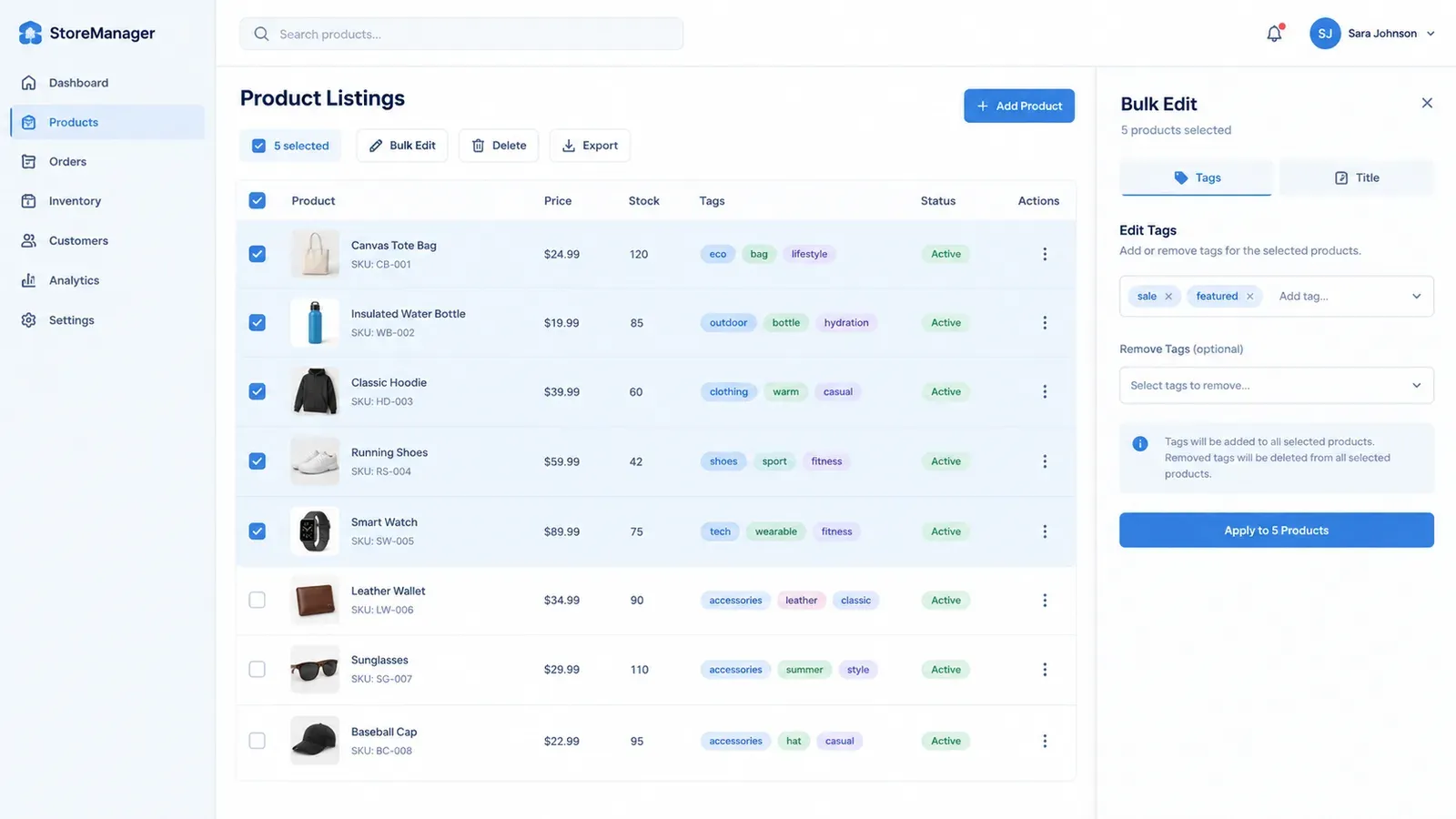
Listybox’s Bulk Edit feature is designed around a simple, powerful logic: select, define, apply, review. You are always in the driver’s seat. Here’s the practical workflow that would solve Sofia’s problem:
First, you connect your Etsy shop. Then, from your Listybox dashboard, you select the specific listings you want to edit. You can filter by product type, like all mugs, or manually select the 150 seasonal items. Next, you define the action. You choose to edit the “Tags” field. You then choose an operation: “Add” new tags like “Christmas Gift” and “Stocking Stuffer,” or “Remove” the old “Spooky Season” tags. You type the changes once. With one click, Listybox applies this change to every single listing you selected, in minutes, not hours. You then get a clear overview to review the changes before they are pushed to your live Etsy shop. You are not watching a loading bar for each listing; you are making one smart decision and executing it universally.
Moving Beyond Tags: Description and Title Overhauls
The same logic applies to descriptions and titles. Imagine you want to add a new line to the bottom of 200 descriptions: “Now available with upgraded, eco-friendly packaging.” With the Bulk Edit feature, you select the “Description” field, choose the “Append” or “Add to End” option, paste your sentence, and apply. It’s done. To change a title, you can use a “Find and Replace” function. For example, find “Cotton T-Shirt” and replace it with “Soft Organic Cotton Tee” across all your apparel listings. This level of precise, mass-scale control is what turns a painful weekend task into a 20-minute coffee-break activity. For a complete walkthrough of the listing creation side of things, read our guide on Your First Etsy Listing with Listybox: A Step-by-Step Guide.
How Does Bulk Editing Help My Etsy SEO Without Triggering Penalties?
A common fear among sellers is that making too many changes too quickly will somehow penalize their shop with the Etsy algorithm. This is a valid concern, but the risk comes from how you make the changes, not the changes themselves. A poorly executed, rapid-fire manual edit session looks chaotic. A strategic, controlled, and scheduled update looks professional.
The “Steady Stream” Strategy with Scheduled Publish
The smartest way to implement a major SEO overhaul is not to blast 300 updates live at 2:00 AM. It’s to trickle them out in a way that mimics natural, consistent shop activity. This is where the power of combining Bulk Edit with a scheduling tool becomes apparent. You can make all your SEO changes at once within Listybox, perfecting every title and tag in a single, focused session. Then, instead of publishing them all in minutes, you use the Scheduled Publish: The Algorithm Strategist feature.
You can set a schedule, for example, to publish the updated listings in batches of 10 every few hours. This creates a steady stream of fresh, optimized content for Etsy’s algorithm to crawl, rather than a single spike that could be flagged as bot-like behavior. This strategy shows the algorithm that your shop is active, well-maintained, and constantly improving, which are all positive quality signals. You get the SEO benefit of a complete overhaul with the safety profile of a gradual, organic update.
Maintaining Consistency for Stronger Relevance
Etsy’s search algorithm loves consistency. When a shopper searches for a “personalized leather journal,” Etsy scans for listings where the title, tags, and description all strongly reinforce that specific product concept. When you manually edit 100 listings for this keyword, you will inevitably have variations: “Personalized Leather Journal,” “Leather Journal Personalized,” “Custom Leather Notebook.” This dilutes your SEO strength. Bulk editing allows you to ensure perfect, consistent keyword matching across every single relevant listing. You can define the exact primary keyword phrase once and apply it flawlessly to every title and tag set. This creates a powerful, unified signal that tells Etsy exactly what you’re selling, which can improve your visibility for that specific search term. Learn more about how to get your products seen in our post on Etsy Search Engine Optimization: A 2026 Guide for Print-on-Demand Sellers.
What’s the Smarter Alternative to Manual Etsy CSV File Editing?
Some advanced sellers try to bypass the one-by-one interface by using Etsy’s CSV (spreadsheet) upload tool. They download their listings, open them in a spreadsheet editor, make changes, and re-upload the file. While this can be faster for simple text changes, it comes with its own set of significant risks and complexities that make it a fragile and often dangerous solution for anyone who isn’t a data management expert.
The Fragility of Spreadsheet Editing
Editing a CSV file of your Etsy listings is like performing surgery with a chainsaw. It’s powerful, but one wrong move can be catastrophic. A misplaced comma, an extra space in the wrong column, or an incorrect character encoding when saving the file can corrupt your entire upload. This can break your listings, scramble your images, or wipe out your variation data. Fixing a corrupted bulk upload can take days of back-and-forth with Etsy support. The spreadsheet method also completely removes you from the visual context of your listing. You are editing raw text, tags, and pricing numbers in a grid, unable to see how the title looks with the first image or how the description flows on the actual product page. It’s a high-risk, low-context method.
The Visual, Controlled Alternative
A dedicated bulk editing tool provides the speed of a CSV edit without the fragility. You work in a visual interface designed for the task. When you use the Bulk Edit feature, you see your listing data in a structured, human-readable format. You can make changes and immediately review them in a preview mode that shows you how they will look live. There is no risk of corrupting a file format because you are working directly with a system built to communicate perfectly with Etsy’s API. You get the power of mass editing with the safety and clarity of a visual interface. It combines the speed of a spreadsheet with the safety of the native editor, giving you the best of both worlds without the technical headaches.
Is It Time to Automate Your Etsy Shop Maintenance?
The distinction between “working on your business” and “working in your business” is never more clear than when you’re faced with a bulk editing task. Sofia, our teacher and seller, didn’t start her shop to become a full-time data entry specialist. She started it to share her creativity and build a secondary revenue stream. Every hour spent manually changing tags is an hour not spent designing her next best-selling shirt or engaging with her customers.
From Manual Labor to Strategic Direction
Automating your shop maintenance with a tool like Listybox isn’t about handing over control. It’s about reclaiming your role as the creative director and head of strategy. You still decide which keywords to target. You still write the compelling descriptions. You still set the prices. The difference is that you implement these strategic decisions across your entire catalog in minutes, not hours. This speed gives you a massive competitive advantage. You can react to a new trend today and have your entire shop optimized for it by dinner time, while your competitors are still planning their weekend work session.
The path forward is to stop seeing your shop as a collection of individual listings that each need to be manually cared for, and start seeing it as a single, dynamic entity that you can command with precision. This is the workflow that separates a stressful side-hustle from a scalable, professionally managed online business.
Start free - no credit card required to put this smarter workflow into action. Select your listings, define your changes, and take back your evening. You can also explore our Listybox Pricing Plans: Free vs. Paid Comparison for Etsy Sellers to see which plan unlocks the full power of bulk editing for your growing shop.
Listybox
Create listings 10x faster with Listybox.
Frequently asked questions
Put this into practice in your shop.
Every step from design to live listing, on one platform. Start on the free plan.
Related posts



Want to go deeper? Read our in-depth Etsy guides · Browse 100 Etsy niche guides