



Key takeaways
A good Etsy SEO tool should turn research into a live, optimized draft, not just show you a chart of keywords.
Always test a tool with a real product from your niche to see if the suggestions are relevant and practical.
Avoid tools that force you to copy-paste data between tabs; the real value is in an integrated workflow.
Manual SEO work hides a massive time-sink trap that delays your shop’s growth.
An all-in-one platform lets you handle SEO, visuals, and publishing in one place, keeping you in control without the busywork.
Imagine you are Liam, an engineer with a sharp eye for efficient systems. You have decided to open an Etsy print-on-demand shop to build a side income. You know that getting found is the first battle, so you start Googling the best Etsy SEO tools. You expect to find a simple piece of software that tells you what to write and where to put it. Instead, you find a maze of dashboards full of graphs, search volume numbers, and click-through-rate projections.
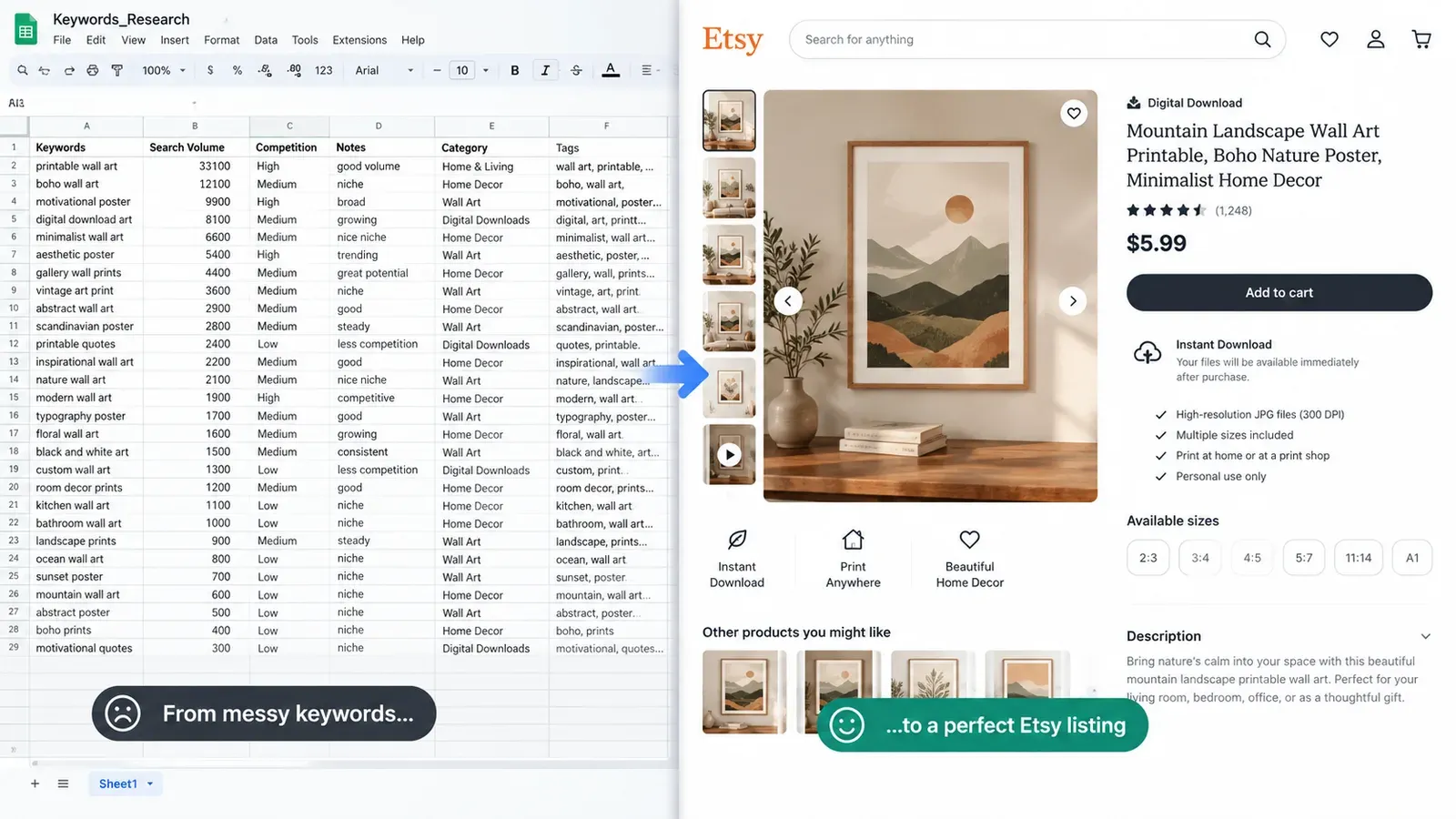
You sign up for one of the popular data tools. An hour later, you are still staring at a spreadsheet-like interface, trying to manually stitch together a title from a list of keywords. You came to solve a problem, but you just bought yourself a new part-time job as a data analyst. This is the exact moment where the search for the best Etsy SEO tools goes wrong. It is not about finding the tool with the most data; it is about finding the one that integrates into a workflow you can actually sustain.
What Should an Etsy SEO Tool Actually Do for My Business?
A real Etsy SEO tool should do more than just spit out data. It should bridge the gap between research and a live listing. The core job is to help you get found by matching your product to what buyers are typing into the search bar. But if the tool stops there, it leaves you with a pile of raw materials and no finished product.
Think about the actual mechanics of listing an item. You need a title that reads naturally but contains the primary keywords. You need 13 tags that cover every possible angle. You need a description that sells the item while reinforcing your keywords. If your tool gives you a list of 500 keywords and then requires you to manually pick 13, arrange them, and write the copy yourself, it is not a solution. It is a dictionary. A dictionary is useful, but it doesn’t write the book for you.
A tool that fits a professional workflow should take a product concept and produce a complete, editable draft. It should understand the relationship between a design and a product. For example, a “funny cat dad” design on a mug needs different keywords than the same design on a hoodie. The context changes. A generic keyword tool will give you the same list for both. A smarter approach, like the Magic Wand feature, analyzes the specific creation (design plus product) to generate a contextually relevant title, all 13 tags, and a full description in one go. You are not left to figure out the puzzle; you are given a draft to review and refine.
This is the difference between a tool that gives you homework and a tool that gives you a head start. You still keep the final control, editing any word that doesn’t perfectly match your brand voice. But you skip the blank-page paralysis. For a deeper look at how this shift from manual research to automated drafting works, check out our guide on Intelligent Etsy Listing Generator: The One-Click Solution to Perfect SEO Listings.
💡 Practical tip: When evaluating a tool, don’t ask “How much data does it have?” Ask “How much of the listing does it write for me based on that data?”
The Integration Factor: Beyond the Text Box
An SEO tool also needs to play well with the other parts of your business. A listing is not just text. It is visuals, pricing, and mockups. If your SEO tool is an island, you will waste hours exporting data and importing it elsewhere. The best Etsy SEO tools act as a central hub. They connect to a product catalog so you don’t have to re-enter specifications. They connect to a design library so you can in minutes see what you are optimizing.
Consider the visual aspect. Etsy is a visual platform. Your main image often does more to drive clicks than your title. If your SEO tool doesn’t help you create better visuals, it is only solving half the problem. Look for a platform where you can not only write the perfect title but also generate lifestyle images that show the product in context. Listystyle does exactly this by placing your product into realistic scenes, giving you a visual asset that complements your optimized text. This creates a cohesive listing where the image and the copy reinforce each other, which is a strong signal to both the algorithm and the buyer.
How Can I Test an Etsy SEO Tool to See If It’s Right for Me?
You wouldn’t buy a car without a test drive. You shouldn’t commit to an SEO tool without a practical, hands-on evaluation. Most tools offer a way to kick the tires, but sellers often waste this period by clicking around randomly. You need a structured test that simulates your real workflow.
Start by picking one specific product from your shop or a product you plan to sell. Do not test with a generic item like “women’s t-shirt.” Use something specific, like “funny mechanical engineer coffee mug.” This specificity is the only way to judge if the tool understands niche language. Your test should follow a clear three-step process.
First, observe how the tool handles keyword discovery. Does it just dump a massive list, or does it group related terms? Does it show you the search intent behind the phrase? A good tool will help you understand not just what people search for, but why. Second, watch how it translates keywords into a listing draft. This is the critical moment. If you have to open a separate document and start copy-pasting, the tool has failed the core efficiency test. The tool should offer a structured output - a title, tags, and a description - that you can edit within the same interface.
Third, evaluate the editing experience. You will never accept a first draft without changes. So, how easy is it to tweak the output? Can you lock a keyword you love and ask the tool to regenerate the rest? Can you adjust the tone of voice? A tool that makes editing painful is just as bad as one that makes drafting impossible. You want to spend minutes, not hours, polishing the final text. This is the standard you should hold every tool to.
⚠️ Important warning: If a tool makes you manually copy and paste keywords from its interface to Etsy’s listing form, it is not saving you time. It is just adding a step.
The Real-World Scenario Test
Let’s run a hypothetical test. You find a tool with a “free plan” that gives you access to basic features. You input “retro synthwave sunset t-shirt.” A pure data tool will return a list of keywords like “synthwave shirt,” ”80s aesthetic,” and “outrun style,” along with some search volume estimates. You now have to decide which 13 to use, in what order, and then write a title that strings them together. You spend 45 minutes crafting a title, only to realize you are not sure if it reads like a human wrote it.
Now, imagine a different scenario with an integrated platform. You select the “retro synthwave sunset” design from your Artwork Gallery and a t-shirt from the product catalog. You click a single button. The Magic Wand analyzes the design’s colors, themes, and target audience. It generates a title like “Retro Synthwave Sunset T-Shirt, 80s Aesthetic Outrun Style Tee, Vaporwave Graphic Top.” It fills all 13 tags with relevant long-tail phrases. It writes a description that talks about the vibe, the material, and the perfect occasion to wear it. You spend 15 minutes reviewing, tweaking a few words, and you are done. This is the difference a proper workflow makes. You can see exactly how this one-click approach changes the game in our guide on Listybox Magic Wand: The Complete Guide to One-Click Etsy SEO Listings.
What Are the Biggest Red Flags When Choosing an Etsy SEO Platform?
When you are in the research phase, every platform looks shiny. They all promise better visibility and more sales. But there are specific red flags that signal a tool will slow you down rather than speed you up. Recognizing these early can save you months of frustration.
The first and most common red flag is a disconnected workflow. This happens when a tool specializes in only one tiny slice of the puzzle, like keyword research, and ignores the rest. You get a beautiful dashboard of keywords, but to use them, you must log into Etsy, open your listing, and manually type them in. This disconnect is where errors creep in and where your time disappears. A tool that doesn’t help you execute is just a fancy textbook.
Another major red flag is a lack of context-aware suggestions. If the tool gives you the same keyword suggestions for a mug as it does for a digital download, it is not analyzing your product. Etsy’s algorithm heavily weighs relevance. A generic tool that doesn’t understand the difference between physical and digital goods will lead you to use keywords that get views but no sales. For example, a “digital planner” keyword on a physical notebook listing will only attract buyers looking for an instant download, leading to confusion and returns.
Finally, be wary of tools that overcomplicate the process. Some platforms seem to believe that more data equals more value. They present you with dozens of metrics, historical graphs, and competitive analysis charts. While this data can be interesting, for a solo seller trying to get listings up, it is often a paralyzing distraction. You don’t need a 360-degree view of the market; you need a clear, actionable path to publish an optimized listing. If you find yourself spending more time analyzing the tool’s dashboard than writing listings, that is a massive red flag. For a broader comparison of how different tools stack up, read our breakdown on Best Etsy Tools 2026: Why Smart Sellers Are Ditching Their Tool Stack for an All-in-One Solution.

The Hidden Cost of “Free” Tools
Many sellers start with free tools to keep costs low. This is understandable when you are just starting out. However, a free tool often has a hidden cost: your time. A free keyword tool might give you a list of suggestions, but it won’t write the listing for you. It won’t generate the tags. It won’t help you schedule the publish time. You end up paying with hours of manual labor.
Etsy charges a $0.20 USD fee for listing an item for sale. Taxes may also apply.
Beyond the listing fee, there is the cost of your time. If you spend two hours manually optimizing a single listing, and you value your time at a reasonable hourly rate, that “free” tool just cost you a significant amount. A paid platform that helps you get that same listing done in a fraction of the time pays for itself almost immediately. The key is to look for a platform that offers a genuine free plan with enough functionality to test the core workflow, not just a limited dashboard that forces you to upgrade before you can actually do anything useful.
Why Is a Pure Data Dashboard Often a Trap for Busy Sellers?
Data is seductive. A dashboard full of search volumes, competition scores, and trend graphs makes you feel like a professional market analyst. It feels productive. But for most Etsy sellers, this is a dangerous illusion. You are not a data scientist; you are a creative entrepreneur. Your job is to create and market products, not to spend hours interpreting charts.
The trap works like this: you log in to check a keyword. You see a related keyword with a high search volume and low competition. You click on it. Then you see another. And another. Two hours later, you have a list of 50 “perfect” keywords and zero listings published. This is analysis paralysis. The tool has tricked you into mistaking research for action. The Etsy algorithm does not reward you for having the best spreadsheet. It rewards you for having relevant, well-structured listings that get clicks and sales.
A pure data dashboard also fails to account for the creative context of your product. It might tell you that “funny gift for dad” is a high-volume keyword. But it doesn’t tell you if your specific design actually fits that keyword. It doesn’t analyze your artwork to see if it matches the search intent. This is why data alone is insufficient. You need a bridge between the data and the creative execution. That bridge is a feature that can “see” your design and understand how to position it with words.
The escape from this trap is to demand that your tool produce output, not just insight. The insight is the raw material; the output is the finished product. A feature like Trend Compass is a good example of how data should work. It scans sources to spot emerging trends, but it doesn’t just show you a chart. It produces ready-to-sell designs and a marketing strategy based on that data. It closes the loop. This is the standard you should look for: tools that finish the job.
How Can I Go from Keyword Research to a Live Listing Without the Manual Grind?
The ultimate goal of any Etsy SEO tool is to compress the time between having an idea and having a live listing that can make sales. The manual grind of copy-pasting keywords, writing descriptions, and uploading images is the biggest barrier to scaling a shop. Removing this grind is the single most important thing a tool can do for you.
The solution lies in a unified creation environment. Instead of jumping between a keyword tool, a text editor, and Etsy, you need a single workspace where all these elements come together. This is the philosophy behind the Creation Wizard. It acts as an assembly line for your products. You bring your designs from the My Artworks central design vault, select your products from the catalog, and combine them in bulk. With one click, you create hundreds of product-design combinations, complete with mockups and variants.
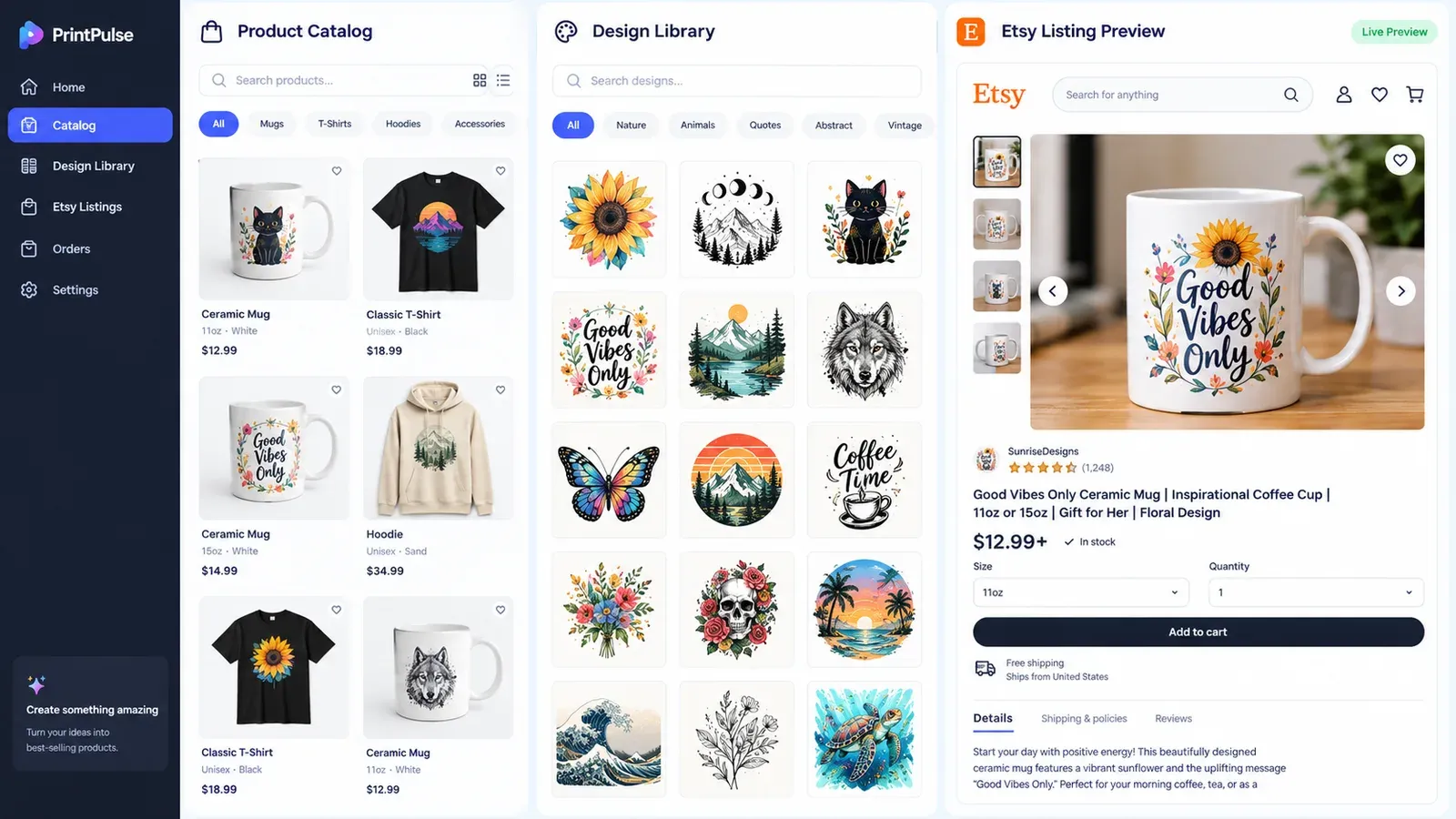
Once you have these creations, the SEO work begins. But it’s not manual work. You select a creation and activate the Magic Wand. It writes the title, tags, and description specifically for that combination. You review it, make your personal edits, and move on. You are not starting from a blank page every time. You are curating and refining, which is a much faster and more satisfying process.
After your listings are optimized, you still need to publish them. Dumping 50 listings onto Etsy at once is not a good strategy. A consistent, steady drip of new content is much better for the algorithm. The manual way to do this is to set calendar reminders and log in every day to publish a few items. The automated way to do this is Scheduled Publish. You set a schedule - for example, publish one listing every 6 hours - and the platform handles the rest. This keeps your shop active and feeds the algorithm fresh content consistently, without you needing to be glued to your computer.
This entire workflow - from blank canvas to a steady stream of published, optimized listings - is what separates a true platform from a simple tool. It is the difference between struggling to keep up and having a system that works for you. If you are ready to experience a workflow where the tool does the heavy lifting, you can see this in action. Start free - no credit card required.
Maintaining Control While Moving Fast
A common fear with automation is losing the personal touch. Sellers worry that an automated listing will sound robotic or miss the nuances of their brand. This is a valid concern, and it is why the best systems are designed for curation, not just generation. You are always the final decision-maker.
With the Bulk Edit feature, you can maintain this control at scale. Imagine you have 100 listings that you want to update with a new shop tag or a seasonal keyword. You can select all those listings, choose to add a specific tag, and apply the change in minutes. You don’t have to open each listing individually. This is the perfect balance: the machine handles the repetitive volume, and you provide the strategic direction. You are the editor-in-chief of your shop, not a data-entry clerk.
This approach to SEO is not about finding a magic bullet. It is about building a smart system. The best Etsy SEO tools are the ones that form the backbone of this system, connecting your designs, your products, your keyword strategy, and your publishing schedule into one smooth, manageable flow. This allows you to focus on what you actually enjoy: creating designs and building a brand that connects with customers.
Listybox
Create listings 10x faster with Listybox.
Frequently asked questions
Put this into practice in your shop.
Every step from design to live listing, on one platform. Start on the free plan.
Related posts


Want to go deeper? Read our in-depth Etsy guides · Browse 100 Etsy niche guides